


.png?width=141&height=141&name=Transact%20(1).png)






.svg)

.svg)
.svg)
.svg)


%201.svg)

















Quick answer
A SIP trunk is a virtual phone line delivered over the internet using Session Initiation Protocol (SIP), replacing physical Public Switched Telephone Network (PSTN) circuits with a connection that can carry voice, video, and messaging traffic — including the call path Microsoft Teams uses for Direct Routing. This guide is written for IT infrastructure leads, voice and network engineers, and unified communications (UC) managers evaluating a SIP trunk service, planning a Direct Routing deployment, or troubleshooting one that's already live — including teams in regulated environments like financial services and healthcare, multi-site contact centers, and public sector agencies migrating off an aging Private Branch Exchange (PBX).
Key takeaways
- What a SIP trunk replaces:
Why it's still the backbone of most enterprise voice deployments, even as organizations move to cloud UC platforms. - How it fits into Microsoft Teams Direct Routing:
A SIP trunk alone isn't enough — Direct Routing also needs a certified session border controller (SBC). - What to evaluate in a SIP trunk service:
Carrier redundancy, SBC compatibility, coverage, and security before you commit voice traffic to it. - How to test a SIP trunk:
What to check before go-live and how to stress-test call capacity. - The most common causes of degraded calls:
Packet loss, jitter, and latency, and how to tell them apart. - What a SIP trunk exposes you to:
Toll fraud, denial-of-service against the SBC, and interception risks that a physical phone line never carried. - Where monitoring fits in:
Why ongoing SIP trunk visibility matters more after go-live than before it.
What is a SIP trunk?
The virtual replacement for a physical phone line
A Session Initiation Protocol (SIP) trunk is an internet-based replacement for the Integrated Services Digital Network (ISDN) system that older phone lines relied on. It converts voice into digital data packets and carries them over an internet connection, using a set of protocols delivered through a SIP provider, also known as an internet telephony service provider (ITSP).
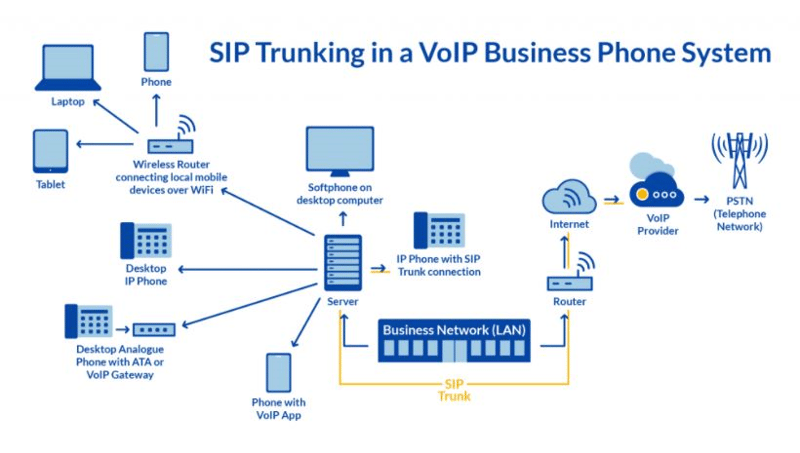
A trunk is simply the group of channels that carries calls — the same concept as the bundle of copper wiring that once ran between a business and the phone company, now replaced by a virtual collection of assigned channels, each able to carry one call at a time. Most enterprise deployments size their trunk to peak concurrent call volume, not total headcount.
SIP, VoIP, and RTP answer three different questions. SIP is the signaling protocol that sets up, modifies, and tears down a call. Voice over Internet Protocol (VoIP) is the broader category — the connection, bandwidth, and hardware that let you place a call over the internet at all. Real-Time Transport Protocol (RTP) is what actually carries the voice packets once SIP has established the session, with Real-Time Transport Control Protocol (RTCP) running alongside it to report quality statistics. In short: SIP starts the call, RTP carries it, and VoIP is the environment all of it runs in.
Why SIP trunk services replace legacy phone lines
Lower cost, less hardware, more flexibility
Enterprise and mid-market voice teams have moved to SIP trunk services for a consistent set of reasons, and most of them still hold up:
- Lower monthly telephony costs:
Removing physical circuits and the hardware that terminates them typically reduces monthly telephony spend, since long-distance and international calls route over the internet rather than dedicated lines. - Scalability without new wiring:
Adding a location, a remote worker, or a temporary spike in call volume is a configuration change on a SIP trunk, not a truck roll to run new cabling. - Network consolidation:
Voice and data can run over the same network connection instead of two separately billed services, simplifying both the bill and the number of vendors involved. - Less physical infrastructure to maintain:
Handsets connect through the existing data network rather than a dedicated phone wiring plant, which matters more as office footprints shrink and hybrid work spreads users across more locations. - Carrier-level redundancy:
A well-architected SIP trunk service can fail over between carriers or points of presence during an outage, something a single physical circuit can't do on its own.
Sizing a trunk correctly is where a lot of the cost benefit either shows up or gets lost. A trunk is provisioned in channels, and each channel handles one simultaneous call — so a 200-person office rarely needs 200 channels, since not everyone is on a call at the same moment. Most organizations size to their observed peak concurrent call count plus a margin for growth, then adjust after a few months of real usage data rather than guessing from headcount on day one.

None of this is free of trade-offs. A SIP trunk depends entirely on the health of the underlying internet connection and the SBC or gateway handling it, which is why the sections below spend more time on evaluation, testing, and monitoring than on the sales pitch for switching.
SIP trunk services vs. Microsoft Calling Plans and Operator Connect
Three ways to connect Teams Phone to the PSTN — and they aren't interchangeable
Before evaluating individual SIP trunk services, it's worth confirming that a bring-your-own-trunk model is actually the right fit for Microsoft Teams Phone in the first place. Microsoft offers three distinct PSTN connectivity options, and the difference between them is who controls the carrier relationship — not just how the call gets routed.
| Connectivity model | Who controls the carrier | Best fit |
|---|---|---|
| Microsoft Calling Plans | Microsoft | Smaller deployments in one of the countries Microsoft supports directly, where simplicity matters more than carrier choice. |
| Operator Connect | A Microsoft-partnered carrier, managed through the Teams admin center | Organizations that want carrier choice without deploying and maintaining their own SBC. |
| Direct Routing (SIP trunk + SBC) | The organization, via its own SIP trunk provider | Organizations with an existing carrier relationship, a multi-country footprint Operator Connect doesn't cover, or a need to connect legacy PBX and analog devices alongside Teams. |
The trade-off is control versus operational overhead. Direct Routing gives an organization the most flexibility over carrier selection, contract terms, and coexistence with existing telephony equipment, but it also makes that organization responsible for the SBC, the trunk relationship, and the ongoing monitoring that Calling Plans and Operator Connect largely hand off to Microsoft or the partnered carrier. None of the three options is universally correct — the right one depends on how much carrier control is worth the added operational responsibility.
It's also not always a one-time, permanent choice. Organizations that start on Calling Plans for simplicity sometimes move to Direct Routing later once they outgrow Microsoft's supported country list or need to retain an existing carrier contract; the reverse — moving off Direct Routing to reduce operational overhead — happens too, typically once an internal team decides the SBC and trunk management isn't worth continuing to own directly. Either direction is a migration project in its own right, not a configuration toggle, so it's worth treating the initial choice as a considered decision rather than a default.
How a SIP trunk works with Microsoft Teams Direct Routing
Three pieces have to work together: the trunk, the SBC, and Teams
Microsoft gives organizations three ways to connect Microsoft Teams Phone to the public telephone network: Calling Plans (Microsoft acts as the carrier), Operator Connect, and Direct Routing. Direct Routing lets an organization bring its own SIP trunk and its own certified session border controller (SBC) to Teams Phone, rather than buying calling minutes directly from Microsoft. That's the option most enterprises with an existing carrier relationship, multi-country footprint, or a preference for carrier choice end up evaluating.
The path a call takes looks like this: the PSTN carrier delivers the call over a SIP trunk to a Microsoft-certified SBC, which sits at the network edge and translates the carrier's SIP signaling into the format Microsoft Teams requires — sometimes described informally as a Microsoft Teams SIP gateway, though Microsoft's own terminology is Direct Routing plus a certified SBC, not a distinct "gateway" product. The SBC also handles the security and interoperability requirements Microsoft specifies for Direct Routing certification, including domain verification, a public IP and Domain Name System (DNS) entry, and supported codec negotiation. If you're evaluating a session border controller for this role specifically, confirm it's on Microsoft's current certified list before you commit — certification changes over time and an uncertified SBC will not pass Direct Routing traffic reliably.
This is why a SIP trunk for Microsoft Teams is really a two-part decision, not one: the carrier providing the trunk, and the SBC connecting that trunk to Teams. Teams sees the SBC, not the underlying carrier — so SIP trunk problems and SBC problems can look identical from inside the Teams admin center, and the two need to be diagnosed separately.
Before a Direct Routing deployment can carry a single test call, a handful of prerequisites need to be in place on the SBC and the Microsoft 365 tenant side: at least one supported SIP trunk or third-party PBX connected to the SBC, users homed in Microsoft 365, one or more registered custom domains (not the default onmicrosoft.com domain), a fully qualified domain name for the SBC, and a public IP address with a matching DNS entry. Missing any one of these is a common reason a Direct Routing deployment stalls in testing before it ever reaches a production cutover — worth confirming against your specific SBC vendor's current documentation before scheduling a go-live date, since certification requirements and supported models change over time.
Media bypass is worth understanding early rather than discovering it during a performance troubleshooting call. Without it, media traffic for a Direct Routing call travels through the SBC for the entire duration of the call, even after signaling has established the session. With media bypass enabled and properly configured, the media path can route directly between the Teams client and the SBC without an unnecessary hop through Microsoft's cloud media processors, which typically improves latency and reduces the load the SBC has to carry — but it also depends on network topology and firewall configuration that's worth validating during testing rather than assuming it works once it's turned on.
Evaluating SIP trunk services and providers
What to check before you commit your voice traffic to a provider
Choosing between SIP trunk services comes down to a handful of criteria that matter more than price alone, particularly once Microsoft Teams Direct Routing is part of the deployment. The table below sets out what to check and why each item matters in practice.
| What to evaluate | Why it matters |
|---|---|
| Carrier redundancy and failover | A single point of presence means a single point of failure; look for automatic failover across geographically separate routes. |
| SBC certification and interoperability | For Teams Direct Routing specifically, the SBC needs to be on Microsoft's current certified list — the trunk provider isn't the certifying party. |
| Geographic PSTN coverage | Number portability, local presence, and emergency calling rules vary by country and can't be retrofitted easily after go-live. |
| Codec and quality support | Confirm which codecs the trunk supports and how call quality is guaranteed under load, not just at idle. |
| Security posture | Encrypted signaling and media — Transport Layer Security (TLS) for SIP, Secure Real-Time Transport Protocol (SRTP) for the media stream — plus toll-fraud protection, should be standard, not an add-on. |
| Service-level agreement (SLA) and support | Ask what the provider's SLA actually measures — uptime of their network is not the same as your call quality. |
| Monitoring and visibility hooks | Confirm the trunk and SBC expose the call data records and quality metrics your monitoring tools need — this is often overlooked until after go-live. |
| Cost model | Per-channel, per-minute, and bundled-minute pricing behave very differently at real usage volumes — model your actual concurrent call pattern against each option rather than comparing headline rates alone. |
None of these criteria are equally weighted for every organization — a single-site deployment cares less about geographic coverage than a multinational one does, and a regulated industry will weight security and call recording differently than a retailer will. The point of evaluating against named criteria rather than a vendor scorecard is that the same list works whichever provider you're comparing against, and it keeps the decision anchored to your environment rather than a vendor's marketing.
Financial services and healthcare organizations typically add a compliance layer on top of this list — confirming that the trunk provider and SBC support the call recording retention, encryption, and audit trail requirements their regulators expect, since these obligations usually apply to voice traffic regardless of whether it runs over a legacy circuit or a SIP trunk. Contact centers evaluating a SIP trunk service for a multi-site environment tend to weight redundancy and geographic coverage more heavily, since a route failure at one site shouldn't be able to take down inbound calling for the whole operation.
SIP trunk security considerations
A SIP trunk is an open door unless it's configured to close behind you
Because a SIP trunk connects directly to the public internet, it inherits internet-facing risks that a physical phone line never had to consider. Three are worth planning for specifically:
- Toll fraud:
Attackers who gain access to a misconfigured trunk or PBX can route expensive international calls through it at the account holder's cost — often discovered only when the bill arrives, not in real time. - Denial of service against the SBC:
A flood of malformed or excessive SIP requests can overwhelm an under-protected SBC, taking down legitimate call traffic along with the attack. - Signaling and media interception:
Unencrypted SIP signaling and RTP media can be intercepted on an untrusted network path, exposing call content and metadata.
The mitigations map directly to the mitigations named in the evaluation table above: SIP signaling encrypted over TLS rather than plain User Datagram Protocol (UDP), media encrypted with SRTP, rate limiting and access control lists on the SBC to filter unexpected traffic sources, and fraud-detection rules that flag unusual calling patterns — particularly international or premium-rate destinations outside normal business hours. None of this is exotic; it's standard practice for a modern SBC, but it's worth confirming explicitly rather than assuming a provider has it enabled by default.
Testing a SIP trunk before and after go-live
Confirm capacity and call quality before your users find the problems
Before cutting production traffic over to a new SIP trunk, it's worth deliberately trying to break it. A stress test generates a controlled volume of simultaneous calls to confirm the trunk is fully connected to the telephone network and that every provisioned channel is available under load — catching capacity and configuration problems in a test window rather than during business hours.
To test a SIP trunk thoroughly, check each of the following:
- Call establishment:
Confirm inbound and outbound calls connect reliably across every route and number range you plan to use in production. - Concurrent call capacity:
Run simultaneous test calls up to and slightly beyond your provisioned channel count to confirm the trunk behaves predictably at its limit, not just below it. - Failover behavior:
Deliberately simulate a carrier or route outage in the test environment and confirm calls fail over rather than drop. - Quality under load:
Measure jitter, latency, and packet loss during the stress test, not only during a quiet baseline — quality problems often only appear once the trunk is busy.
Once a trunk is live, SIP troubleshooting generally starts with a SIP ladder diagram — a call flow trace showing each SIP message exchanged between the endpoints — because it isolates whether a failed or degraded call broke down during signaling (the call never properly established) or during the media stream (the call connected but quality degraded afterward). Free and open-source SIP tools can capture this trace, but most lack the ability to correlate it against the underlying network path or retain enough history to spot a recurring pattern, which is where a dedicated monitoring platform earns its place alongside them.
Testing shouldn't stop at go-live, either. A trunk that passed every test in a change window can still degrade weeks later as call volume grows, a carrier changes routing, or a firmware update shifts SBC behavior. Scheduling recurring synthetic test calls — placed automatically on a schedule rather than only when a user complains — catches that drift while it's still a minor quality dip, before it becomes a support ticket queue.
SIP tools generally fall into three tiers, and it's worth knowing which one you're actually using. Free packet-capture utilities can show you a SIP ladder for a single call after the fact, which is useful for a one-off investigation but doesn't scale to spotting a pattern across thousands of calls a day. Carrier-provided portals typically show call detail records and basic success/failure rates, but rarely correlate that data against the SBC or the underlying network path. A dedicated monitoring platform sits above both — capturing SIP and RTP data continuously, correlating it against network and SBC health, and retaining enough history to distinguish a one-off blip from a recurring problem worth escalating to the carrier. See our guide to SIP monitoring tools for a closer look at what to expect from each tier.
Common SIP trunk problems and their root causes
Most quality issues trace back to the same handful of causes
VoIP services carried over a SIP trunk run into a recurring set of problems: packet loss, jitter, and latency. Each shows up differently on a call, and each points toward a different fix.
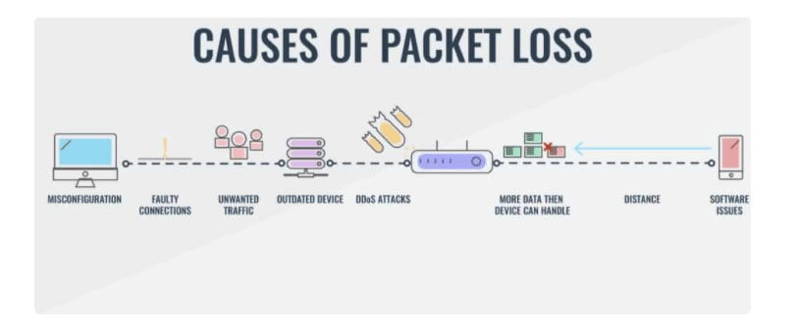
If a call never establishes at all, the cause is usually a configuration or authentication mismatch between the local and remote session border controller, or a failed handshake between the connecting devices. If the call connects but audio is choppy or the connection drops mid-call, that's typically a resource limitation on the local or remote SBC or gateway, or a network impairment somewhere along the path — which is exactly why isolating SIP trunk problems from SBC problems, as covered above, is the first troubleshooting step rather than an afterthought.
Three basic components have to function together for a call to complete successfully: the session border controller, which accepts and sends the call across SIP; the remote SIP gateway on the carrier or destination side; and the Wide Area Network (WAN) connectivity carrying the signaling and media between them. A recurring problem in any one of the three will present as a generic "bad call quality" complaint from users, which is why teams that rely on call quality reports alone — without the underlying SIP and network detail — spend longer finding root cause than teams with visibility into all three layers at once.
A few symptom patterns come up often enough to be worth naming directly:
- One-way or no audio:
Usually a media path problem rather than a signaling one — often a firewall, Network Address Translation (NAT), or media bypass misconfiguration between the SBC and the carrier or Teams. - Calls that drop after a fixed duration:
Frequently a session timer or re-INVITE handling mismatch between the SBC and the far end, rather than a network capacity problem. - Echo on longer calls:
Usually points to a hybrid or analog gateway segment somewhere in the path, or a delay long enough for the local audio to loop back audibly. - Intermittent quality that clusters at certain times of day:
A strong signal that the trunk or WAN link is under-provisioned for peak concurrent call volume, not a random fault.
Best practices for keeping a SIP trunk healthy after go-live
Go-live is the start of the maintenance work, not the end of it
A SIP trunk that performed well during cutover testing doesn't stay that way automatically. A few habits keep it healthy over time:
- Review capacity against actual usage quarterly:
Concurrent call volume grows with headcount and adoption; a trunk sized for last year's peak can become the bottleneck for this year's. - Re-test after any carrier, SBC firmware, or Teams tenant change:
Each of these can shift behavior in ways that don't show up until the next busy period. - Keep SBC certification current:
Microsoft's certified SBC list and supported firmware versions change; an SBC that was certified at deployment can fall out of support later. - Correlate quality data across the trunk, the SBC, and Teams:
Treating these as one connected system, rather than three separately monitored components, is what actually shortens root-cause time when something does go wrong.
How IR Collaborate can help
Turning SIP trunk data into an answer, not just an alert
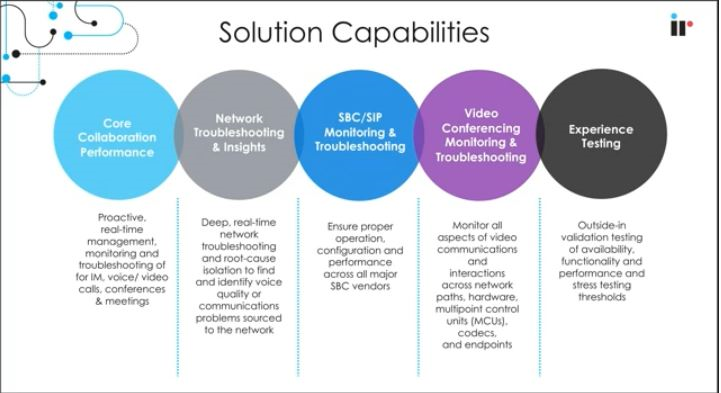
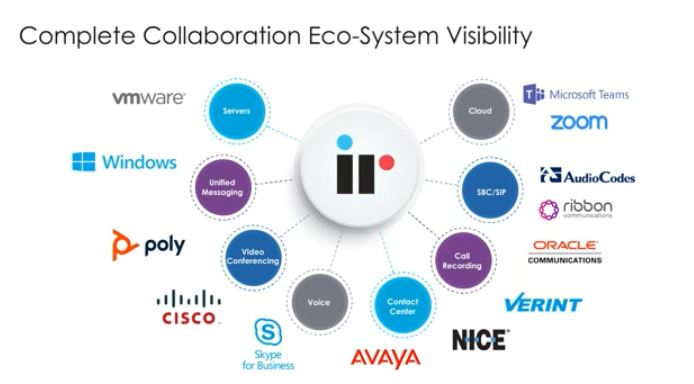
As voice environments shift toward hybrid and cloud-connected UC, managing complex, multi-vendor communications infrastructure gets harder to do with spreadsheet-level visibility alone. Most of the troubleshooting steps covered in this guide — isolating a signaling failure from a media failure, telling a trunk capacity issue apart from an SBC resource limit, and confirming whether media bypass is actually engaged — depend on having that data in one place rather than reconstructed after the fact from three separate systems. IR Collaborate gives enterprise teams a way to monitor SIP trunk performance, Direct Routing call quality, and the SBCs connecting them, from a single view rather than switching between the carrier's portal, the SBC's own logs, and the Teams admin center separately. That includes:
- Root-cause identification:
Correlating SIP signaling, SBC health, and network metrics to identify where a degraded or failed call actually broke down. - Real-time traffic analysis:
Tracking SIP trunk and Direct Routing traffic as it happens, rather than reconstructing it after a complaint. - Trunk availability and performance correlation:
Watching trunk availability alongside quality metrics like jitter, packet loss, and latency, so a capacity problem and a quality problem don't get mistaken for each other. - Server and SBC health monitoring:
Keeping an eye on the infrastructure that sits between the carrier and the collaboration platform, not just the call itself. - Proactive alerting:
Flagging degradation before it becomes a volume of user complaints.
For teams specifically managing Microsoft Teams Direct Routing deployments, Microsoft Teams monitoring and management extends this same visibility into the Teams side of the call path, so SIP trunk monitoring and Teams call quality monitoring aren't two separate tools with two separate blind spots between them.
You can see this in action with a live demo.
Frequently asked questions
What is a SIP trunk used for?
A SIP trunk carries voice, video, and messaging traffic over an internet connection in place of physical phone lines. It's what connects an organization's phone system, or a platform like Microsoft Teams, to the public telephone network.
Is a SIP trunk the same as VoIP?
No. VoIP is the broader category of making calls over the internet. SIP is the specific signaling protocol used to set up and tear down those calls, and a SIP trunk is the connection delivered using that protocol.
Do I need an SBC to use a SIP trunk with Microsoft Teams Direct Routing?
Yes. Direct Routing requires a Microsoft-certified session border controller between the SIP trunk and Teams — the SIP trunk alone can't connect directly to Teams Phone.
How do I test a SIP trunk before going live?
Run stress tests that push concurrent call volume up to and beyond your provisioned channel count, simulate a carrier failover, and measure jitter, latency, and packet loss under that load rather than only at idle.
What causes poor SIP trunk call quality?
Most quality problems trace back to packet loss, jitter, or latency somewhere on the network path, or to a resource limitation or misconfiguration on the local or remote session border controller.
What should I look for in SIP trunk services?
Carrier redundancy, SBC certification for your platform (including Microsoft Teams Direct Routing if relevant), geographic PSTN coverage, security posture, and whether the provider exposes the monitoring data your team needs after go-live.
Can I monitor SIP trunk performance alongside Microsoft Teams Direct Routing?
Yes — the two need to be monitored together, since a SIP trunk problem and an SBC or Teams-side problem can look identical from inside the Teams admin center alone.
How is Direct Routing different from Microsoft Calling Plans?
Calling Plans have Microsoft acting as the carrier directly. Direct Routing lets an organization bring its own carrier and SIP trunk, connected through a certified SBC, which gives more control over cost, coverage, and carrier choice.
How many SIP trunk channels does my organization need?
Size the trunk to peak concurrent call volume, not total headcount — most organizations never have every user on a call simultaneously. Reviewing actual concurrent usage after go-live is more reliable than estimating from headcount alone.
Can an existing PBX still work with a SIP trunk?
Yes. Direct Routing and most SIP trunk services are designed to connect alongside an existing PBX or analog devices through the SBC, which is one of the reasons organizations with legacy telephony equipment favor Direct Routing over Calling Plans.
Conclusion
SIP trunking stopped being just a cost-saving swap for ISDN lines the moment it became the connective layer under Microsoft Teams Direct Routing. The organizations getting the most out of it aren't the ones that chose the cheapest trunk — they're the ones that evaluated the trunk and the SBC together, tested both under real load before go-live, and kept visibility into both after it. That last part is the one most deployments skip, and it's usually the reason a "SIP trunk problem" takes days to diagnose instead of minutes.
If your team is planning or troubleshooting a Direct Routing deployment, start with visibility into the whole call path — not just the parts inside the Teams admin center.

Or request a demo to see IR Collaborate monitoring a live SIP trunk and Direct Routing environment.