


.png?width=141&height=141&name=Transact%20(1).png)






.svg)

.svg)
.svg)
.svg)


%201.svg)


















Quick answer
Enterprise unified communications (UC) is the integration of voice, video, messaging, and collaboration tools into a single platform that employees, contact center agents, and partners use across any device. For large organizations, that typically means a cloud-hosted or hybrid UC platform that connects to existing systems like customer relationship management (CRM) software and directory services, rather than a single on-premises phone system running on its own.
Key takeaways
- What enterprise unified communications actually covers, and how it differs from a single collaboration app
- Why the business case for UC keeps growing as hybrid work becomes the default rather than the exception
- How on-premises, cloud, and hybrid deployment models compare on cost, control, and scalability
- The core benefits enterprise UC delivers: collaboration, cost, customer experience, culture, and IT management
- The challenges enterprises run into most often, during rollout and in day-to-day operation
- What to look for in a UC monitoring and management platform before you buy one
- How IR Collaborate fits into an enterprise UC strategy, regardless of which vendors sit underneath it
- Answers to the questions IT and communications teams ask most about enterprise UC
What is enterprise unified communications?
One experience across every channel, not five tools stitched together after the fact.
Enterprise unified communications brings voice calling, video conferencing, instant messaging, presence, and file sharing into a single interface, so an employee, agent, or partner isn't switching between separate tools to have one conversation.
Unified communications and UCaaS get used interchangeably, but they answer different questions. Unified communications describes the strategy: consolidating communication channels into one consistent experience. UCaaS, or unified communications as a service, describes how that strategy is delivered — hosted and managed by a third-party provider instead of run on an organization's own servers. An enterprise can be unified without being cloud-hosted, and cloud-hosted without being genuinely unified if the tools don't actually share data with each other.
For most large organizations today, enterprise UC covers business voice, usually delivered over voice over internet protocol (VoIP) rather than a legacy private branch exchange (PBX), video conferencing, team messaging platforms like Microsoft Teams or Slack, contact center integration, and mobile access that keeps all of it consistent whether someone is at a desk or between meetings on their phone. The common thread across all of it is a single point of visibility, rather than a system built from separate parts that happen to sit near each other.
A single collaboration tool isn't the same thing as an enterprise UC platform, even when it handles video and messaging well. The distinction matters at scale: a team-level chat app solves communication within one group, while enterprise UC has to connect voice, video, messaging, and contact center data across every team, region, and device an organization runs — usually with IT and communications leadership jointly responsible for it, rather than one department alone.
Why enterprise unified communications matters now
More platforms, more integration points, more places for a problem to hide.
The market isn't slowing down. The global unified communications market is on track to grow from roughly USD 229.4 billion in 2026 to USD 417.9 billion by 2030, a compound annual growth rate of 17.4%, according to Grand View Research. Hybrid work made that growth durable rather than a short-term spike; distributed teams need a consistent way to communicate regardless of location, and that need hasn't reversed as offices have reopened.
For enterprise IT and communications leaders, the question isn't whether to invest in UC. Most already have, often across more than one vendor. The harder question is whether the platform holds up under real usage — across regions, devices, and vendors — without needing a dedicated team to manually piece together why a call dropped or a meeting lagged. As the number of connected platforms grows, so does the number of places a small issue can hide before it reaches a customer or an executive's inbox.
How enterprise UC has changed: then vs. now
The shift from a single phone system to a connected ecosystem happened faster than most infrastructure roadmaps accounted for.
Enterprise unified communications has changed more in the past decade than in the twenty years before it. The table below shows what changed, and why it matters for how you plan, secure, and support UC today.
| Area | Then | Now |
| Technology and integration | A voice-only private branch exchange (PBX) loosely connected to email and basic instant messaging | Voice, video, messaging, and contact center data unified in one platform, integrated with CRM and other core business systems |
| Mobility | Fixed desk phones; mobile access limited to call forwarding or SMS | Mobile-first design; employees and customers reach the same platform from a smartphone, tablet, or laptop |
| Collaboration tools | Email threads and voice conference calls, with minimal file sharing | Real-time video meetings, shared whiteboards, simultaneous document editing, and persistent chat as standard features |
| Workplace culture | Office-centric, with in-person meetings and travel required for distributed teams | Hybrid and remote work supported as the default operating model, not an exception managed around the edges |
| Interoperability and user experience | Vendor systems operating in isolation, with siloed data and steep training curves | Open APIs and shared industry standards connect platforms; interfaces are largely self-service |
| Security | Perimeter firewalls and basic encryption for email and voice | End-to-end encryption, multi-factor authentication (MFA), and compliance frameworks like the General Data Protection Regulation (GDPR) and the Health Insurance Portability and Accountability Act (HIPAA) built into the platform |
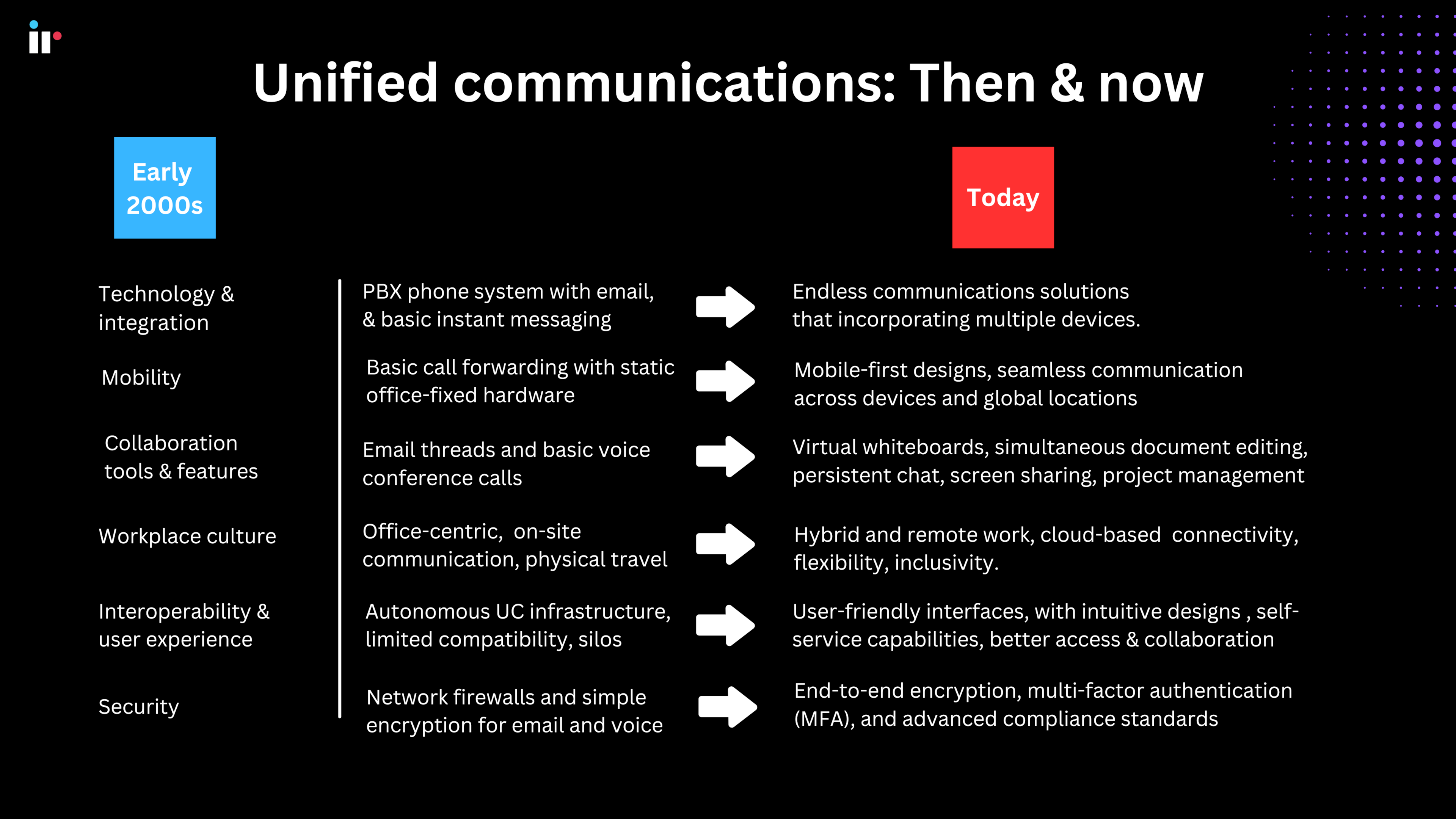
The practical implication is that UC stopped being a single system a technician could troubleshoot in isolation. It's now a chain of platforms, carriers, and network paths, and a problem in any one link can look identical to a problem in another until someone can see across all of them at once.
Enterprise UC deployment models: on-premises, cloud, and hybrid
Cloud UCaaS dominates new deployments, but "cloud-first" isn't the same as "cloud-only."
Choosing how to deploy enterprise UC is a separate decision from choosing what it includes. The three common models trade off differently on cost, control, and scalability, and the right one depends on the organization's regulatory footprint as much as its budget.
| Deployment model | Upfront cost | Ongoing maintenance | Data control | Typical best fit |
| On-premises | High: hardware and licensing | Managed in-house; slower to update | Full control over where data lives | Regulated industries with strict data residency requirements |
| Cloud (UCaaS) | Low; subscription-based | Handled by the provider | Shared responsibility with the vendor | Organizations prioritizing speed of deployment and scale |
| Hybrid | Moderate; combines both models | Split between internal teams and the provider | Selective, with sensitive workloads kept on-premises | Enterprises migrating gradually, or with regional compliance needs that vary by location |
None of these models is inherently more reliable than the others; each simply shifts where the responsibility for visibility sits. What stays constant across all three is the need to monitor performance independent of whichever vendor or hosting model sits underneath, particularly for organizations running more than one platform at the same time.
Key benefits of enterprise unified communications
The payoff shows up in three places: the people using it, the people running it, and the budget.
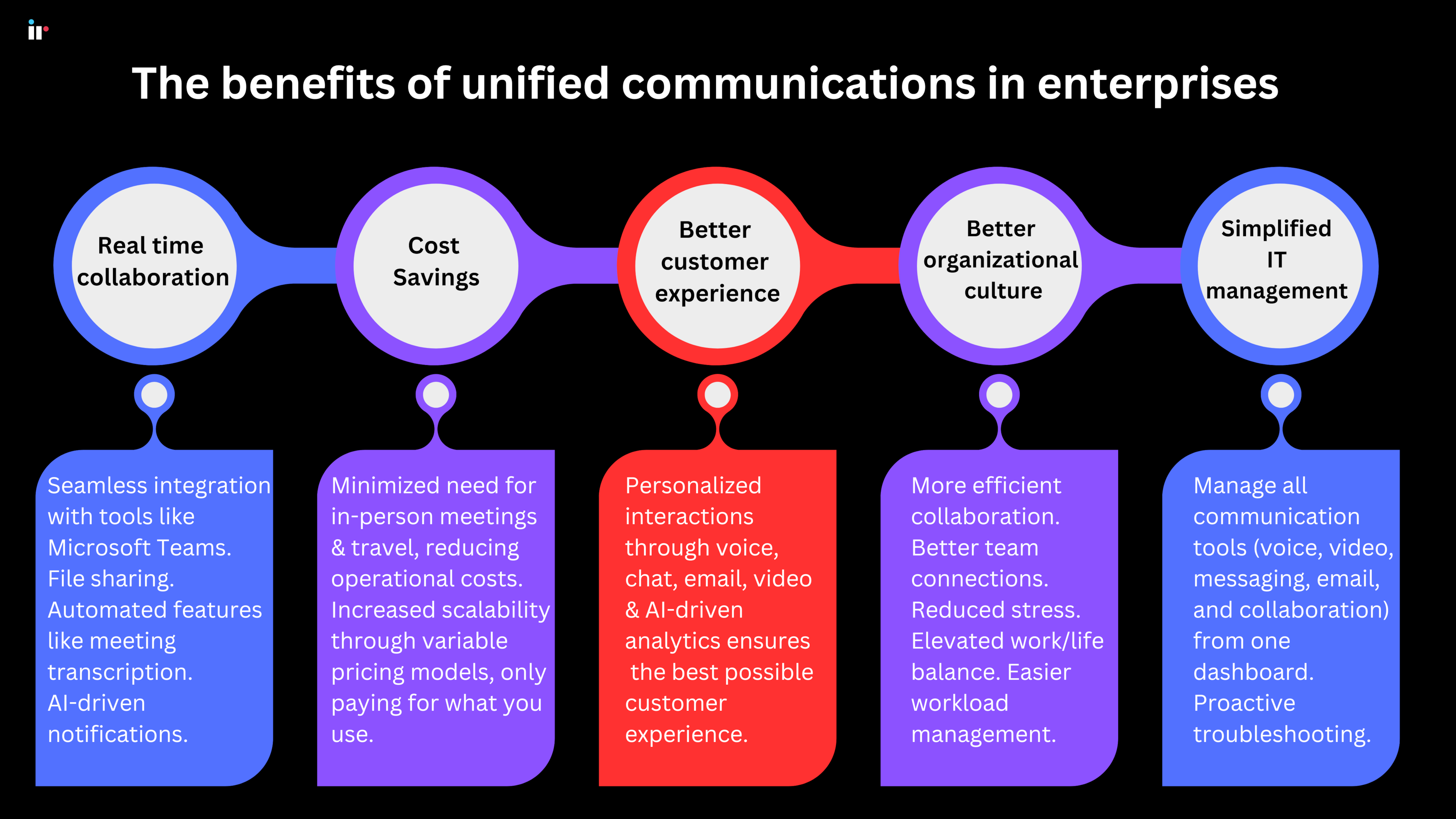
The benefits of enterprise UC are well established, but they compound rather than sit side by side. Better collaboration reduces the operational cost of communication, which frees up budget that can go toward customer experience instead of maintaining five separate tools.
- Real-time collaboration across teams and stakeholders
Instant messaging, video meetings, and shared virtual workspaces replace the delay of email threads and voicemail, so distributed teams can make decisions inside the same conversation instead of over several days. - Lower operating costs
Cloud-based UC removes the need for on-premises hardware and the maintenance that comes with it, while high-quality video reduces the need for in-person meetings and the travel budget attached to them. - Stronger customer experience
Integration with CRM systems gives contact center agents a single view of customer history, and analytics can surface patterns worth acting on — the subject of our guide to customer experience monitoring. - A more connected organizational culture
Open feedback channels and flexible, asynchronous communication reduce the silos that come with large, distributed teams — silos that carry a real cost, covered in the true cost of poor employee experience. - Simplified IT management
A single dashboard for provisioning, security policy, and troubleshooting replaces separate consoles for voice, video, and messaging, cutting the time it takes to add, remove, or update users across the organization. - A stronger compliance posture
Centralized policy enforcement makes it easier to apply encryption, retention, and access rules consistently, rather than checking each platform separately when an audit or a regulatory framework like GDPR or HIPAA applies.
Common enterprise UC challenges
None of these are reasons to avoid UC — they're reasons to monitor it properly.
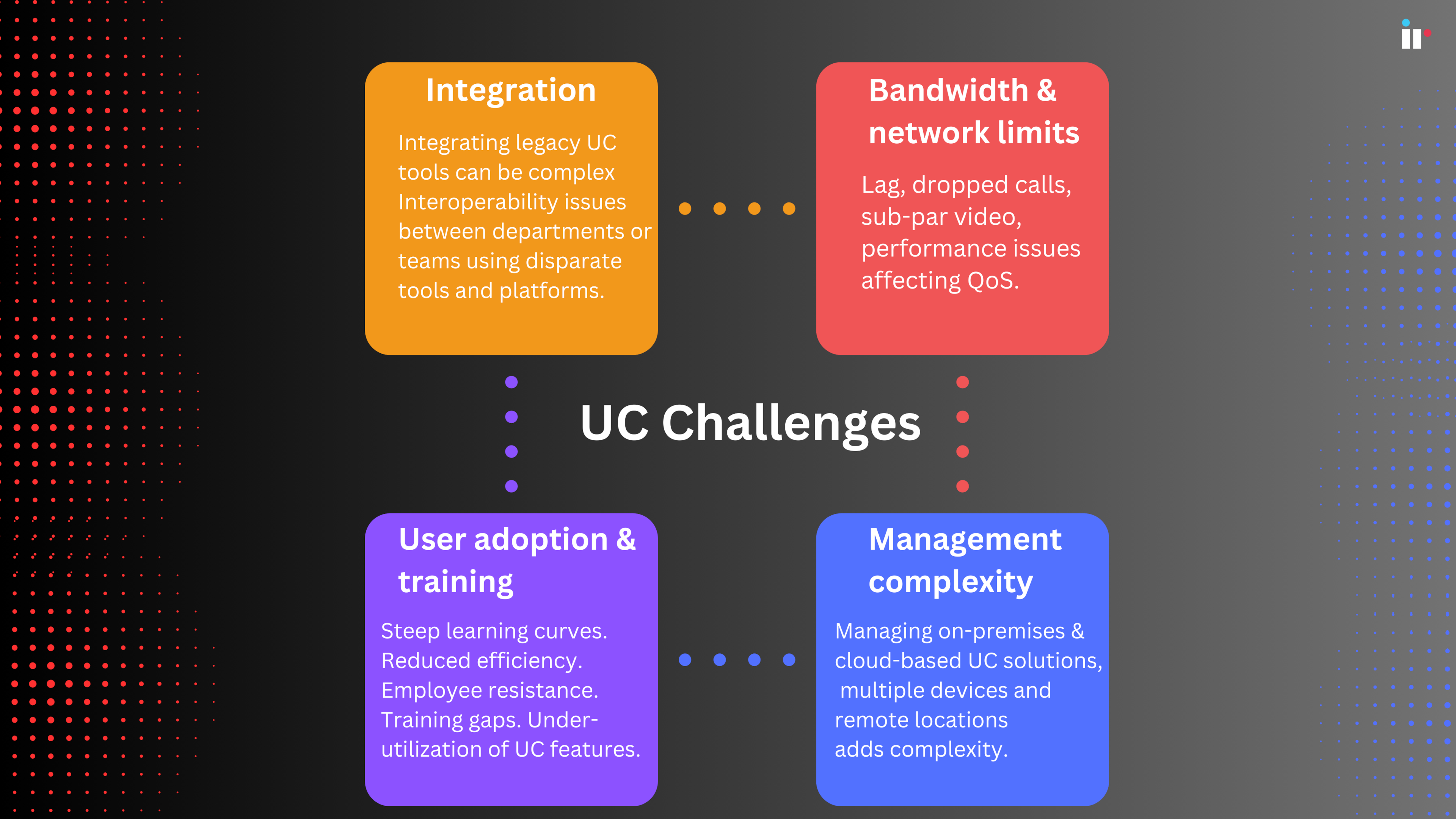
Enterprise UC delivers real benefits, but rollout and day-to-day operation both come with predictable friction points worth planning for in advance rather than discovering after go-live.
- Integration challenges
Connecting UC to legacy systems like an existing PBX, CRM, or enterprise resource planning (ERP) platform can be complex, particularly in Cisco UC environments running a mix of on-premises and cloud components. We cover the specifics in troubleshooting Cisco unified communications. - Bandwidth and network limitations
UC performance depends on available network capacity. Insufficient bandwidth shows up as lag, dropped calls, or degraded video, and prioritizing UC traffic over other network usage takes deliberate quality of service (QoS) configuration rather than a default setting. - User adoption and training
New platforms meet resistance when training doesn't keep pace with rollout. A steep learning curve slows adoption and can push employees back toward the tools they already know, undermining the investment. - Management complexity
Running a mix of on-premises and cloud UC, across multiple devices and regions, adds administrative overhead. Getting ahead of it depends on the kind of ongoing visibility covered in unified communications performance management.
How to evaluate an enterprise UC monitoring and management platform
The platform matters less than what you can actually see once it's running.
Most enterprise UC problems aren't caused by the platform itself; they're caused by not knowing where in the chain something broke. A monitoring and management layer is what turns that from a guessing game into a diagnosis.
- Proactive monitoring and alerting
Live, customizable dashboards that track call quality, bandwidth, and overall system performance, with alerts before a dropped call or outage reaches the end user. - Analytics and reporting
Usage data that shows which tools are genuinely adopted and which aren't, plus metrics like jitter, latency, and packet loss that identify connectivity issues before they escalate — the focus of our guide on UCaaS monitoring. - End-user experience scoring
Visibility into what the person on the call is actually experiencing, not just whether the network is technically up and running. - Security monitoring
Continuous checks for unusual activity and encryption protocol integrity across every connected UC channel, not just the ones judged highest-risk at deployment.
When comparing platforms, prioritize multi-vendor support, so the tool works across Cisco, Microsoft, Zoom, and whatever the organization adds next; real user monitoring rather than synthetic testing alone; and integration with the CRM and IT service management tools already in place. It's also worth checking how a platform handles vendor changes over time — enterprises that switch UC vendors, add a region, or move from on-premises to cloud shouldn't have to replace their monitoring layer along with it. Our unified communications management guide walks through a full, criteria-based evaluation framework.
How IR Collaborate can help
IR Collaborate sits across every layer described above — it doesn't replace any of them.
IR Collaborate gives IT and communications teams a single, vendor-agnostic view across the UC platforms covered in this guide — on-premises, cloud, or hybrid — so a degraded call can be traced from the endpoint through the network to the carrier instead of across five separate dashboards.
- Live dashboards that surface call quality, bandwidth, and system performance issues as they happen, rather than after a user reports them.
- Analytics that connect usage patterns to root cause, so IT teams spend less time isolating where a problem started.
- End-user experience scores that flag degradation before it becomes a support ticket.
- Multi-vendor visibility that holds up whether the enterprise runs Cisco, Microsoft Teams, Zoom, or a mix of all three at once.
Conclusion
The question isn't whether to invest in UC — it's whether you can see it clearly.
By 2030, enterprise unified communications will be a market worth close to USD 418 billion, spread across more vendors and deployment models than any single team can watch manually. That growth means more integration points, and more places for a small issue to hide in plain sight. The organizations getting the most out of UC aren't necessarily running the most advanced platform on the market; they're the ones who can see across every layer of it, regardless of which vendor sits underneath. That visibility is what turns a UC investment into something the business can rely on daily, not just a system that was configured correctly once.
Ready to see call quality, network performance, and system health across your entire enterprise UC environment in one place?

Or talk to us about a demo tailored to your environment.