


.png?width=141&height=141&name=Transact%20(1).png)






.svg)

.svg)
.svg)
.svg)


%201.svg)

















Every CIO wears two hats: championing the technology that moves the business forward, and keeping a tight rein on what it costs to run. Get the balance wrong and you either starve the business of the tools it needs, or bleed budget on infrastructure nobody's using.
Cutting IT costs well isn't about slashing line items. It's about finding where spend isn't earning its keep — underused licenses, oversized infrastructure, manual work that software could do faster — and reallocating that money toward things that actually move the needle, like business continuity and growth.
This guide walks through seven cost reduction strategies IT leaders are using right now to cut waste, improve operational efficiency, and free up budget for what matters.
What IT cost reduction actually means
IT cost reduction is the discipline of lowering both capital and operational spend without breaking what already works. Done well, it doesn't just save money — it funds the next round of investment.
Most cost reduction programs draw from the same playbook:
-
Shifting more workloads to cloud and SaaS
-
Auditing software licensing spend
-
Cutting manual labor with monitoring and performance management
-
Using virtualization to reduce hardware and energy costs
-
Outsourcing IT functions where it makes financial sense
-
Simplifying and consolidating data storage
-
Adopting open source software where it fits
Here's how each one plays out in practice.
1. Move more workloads to the cloud
Downtime is expensive. A hardware, network, or security failure can cost a business more in a few minutes than a full year of cloud subscription fees.
Dedicated servers and desktops also carry hidden costs — software licenses, upgrade cycles, storage, security, and the hours of setup and maintenance that come with all of it.
Cloud computing removes most of that overhead. Scalable cloud options now exist for businesses of every size, making the move away from on-premises infrastructure one of the fastest ways to cut cost.
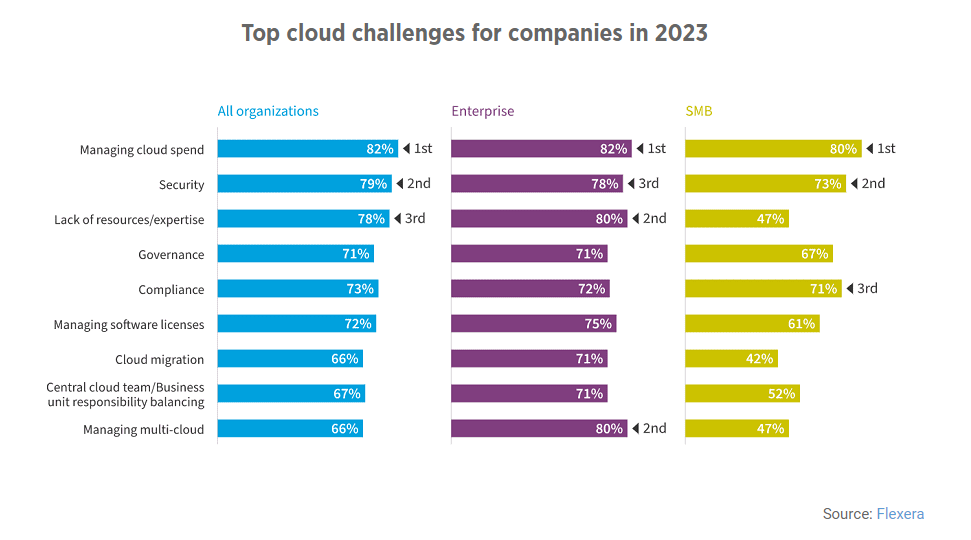
Beyond infrastructure, SaaS adoption reduces the operational headcount needed to maintain on-premises systems — freeing IT staff for higher-value work.
Planning a move to the cloud? Get our Unified Communications Cloud Migration Checklist
According to AWS's analysis of 35,000 migrated servers, moving IT infrastructure to the cloud delivers average annual cost savings of around 30%.

2. Get software licensing under control
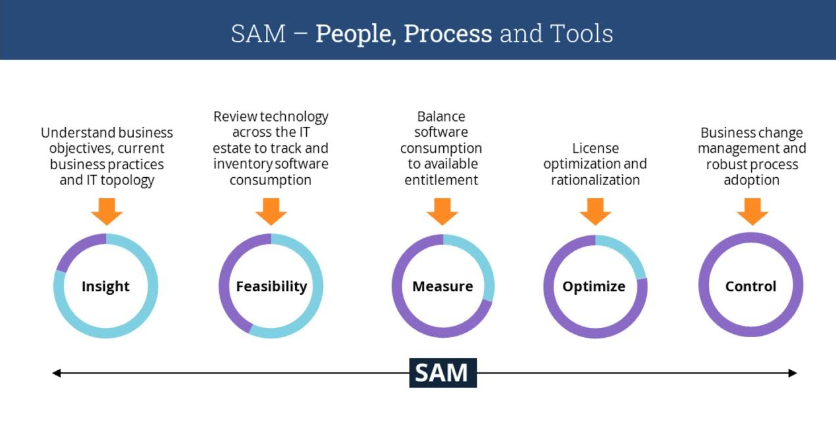
Software license sprawl is one of the easiest costs to miss — and one of the easiest to fix. Start with a full audit of what's licensed, what's actually used, and what's paid for but idle. It's common to find premium software running minor tasks that a cheaper tool could handle just as well.
Software Asset Management (SAM) tools make this ongoing rather than a one-time exercise, giving IT full visibility into the software estate as it grows.
3. Bring in monitoring and performance management
Cloud, virtualization, microservices, containers, and edge computing have all helped IT leaders cut operating costs — but they've also made environments far more complex to run.
In a hybrid, multi-layered IT estate, manually tracking performance and cost drivers isn't realistic. Without full-stack, cross-domain observability into how applications and infrastructure connect, root-causing problems — and the wasted spend they cause — becomes guesswork.
Monitoring and performance management solutions close that gap, giving teams the visibility they need to spot waste and fix issues before they escalate.
4. Use virtualization to cut hardware and energy costs
Dedicated servers per application used to be standard — multiplied further by DR and test environments, most running at low utilization. Businesses still running this model should look at partitioning existing hardware to run multiple workloads on shared infrastructure.
Containers are a natural next step. Lightweight, portable, and self-contained, they let multiple services share the same hardware, cutting infrastructure spend significantly.
Virtualization cuts hardware and energy costs, boosts efficiency, and underpins hybrid and remote working models. By virtualizing servers, storage, networks, and applications, teams get the functionality they need without being tied to physical hardware location.
It also scales in both directions — up when demand spikes, down when it doesn't — which keeps compute and cooling costs proportional to actual use rather than peak capacity.
5. Outsource IT where it makes financial sense
Hiring and retaining experienced in-house IT talent is expensive, and junior hires often lack the depth needed for modern managed environments.
Contractors can fill gaps cost-effectively for defined pieces of work, provided contractor spend is tracked closely so it doesn't creep past the cost of permanent staff.
For broader coverage, many organizations outsource all or part of IT operations to a managed service provider (MSP) — often at lower cost than maintaining the equivalent in-house, with the added benefit of expert-managed security, networks, and infrastructure. Support agreements can be structured around budget and need, from ongoing managed service to pay-as-you-go break/fix arrangements.
6. Simplify data storage
Global data volumes keep climbing, and hybrid and remote work only adds to it — data now lands in home offices, branch locations, and core data centers alike, each adding its own storage, security, and backup overhead.
Converged Infrastructure (CI) and Storage Resource Management (SRM) tools help manage that complexity from a single location, surfacing duplicate and cold data that's quietly consuming (and costing) storage space.
7. Adopt open source software
Licensing and maintenance costs for proprietary software add up fast. Open source software gives teams access to the source code itself, so it can be modified to fit — without waiting on a vendor's roadmap.
Because updates come from a broad developer community rather than a single vendor, improvements tend to ship faster, and support isn't limited to one provider.
Best practices for optimizing IT costs
Start with an honest internal audit of current IT spend, then layer in the strategies above where they fit your environment.
Cost reduction and cost optimization aren't the same exercise. Reduction is about releasing cash quickly — identifying spend that can be cut now without disrupting operations. Optimization is the ongoing work of eliminating waste and improving efficiency over the mid-to-long term.
Either way, the discipline that matters most is reduce, don't freeze. Frozen costs have a habit of quietly reappearing on the balance sheet. Cutting them outright is what actually moves the number.
Why monitoring and performance management matters here
None of the strategies above work without visibility. Whether your IT infrastructure is on-premises, hybrid, or cloud-based, most organizations can't see enough of their own environment to make confident cost calls — which makes waste hard to find and harder to justify cutting.
How IR Collaborate can help
With employees running their own mix of devices and applications, IT teams often lack a clear, unified view of what's actually happening across the environment.
IR Collaborate gives IT teams full visibility into the performance and usage of applications, software, and hardware — the ecosystem intelligence needed to make informed calls on resource allocation, capacity planning, and future investment.
Find out how you can save time and money for your organization