






.png?width=141&height=141&name=Transact%20(1).png)






.svg)

.svg)
.svg)
.svg)


%201.svg)

















In today's business world, the key to success is flexibility, scalability, and the capacity to keep up with ever-evolving communication technologies.
A Unified Communications as a Service (UCaaS) model is a cost-effective alternative to the traditional on-premise, in-house managed communication systems deployed by organizations.
Since 2014, when UCaaS first came into prominence on the heels of the cloud computing movement, unified communications has reduced upfront costs and management overheads, offered a more efficient flexible consumption model, and increased security for organizations globally.
In this guide, we'll explore the features and benefits of UCaaS solutions, implementation and best practices, how UCaaS providers can help streamline collaboration and improve customer experience - and the critical role of network monitoring to ensure that you get the most from your UCaaS platforms.
The Global UCaaS market
According to Fortune Business Insights:
-
The global Unified Communication as a Service (UCaaS) market size was valued at USD 48.79 billion in 2023.
-
The market is projected to grow from USD 56.75 billion in 2024 to USD 215.53 billion by 2032, representing a CAGR of 18.2% during the forecast period.
-
North America dominated the global UCaaS market with a share of 43.25% in 2023.
-
The U.S. UCaaS market is projected to grow significantly, reaching an estimated value of USD 43,199.5 million by 2032.

What is UCaaS?
Definition
UCaaS, or Unified Communications as a Service, is a cloud-based technology delivery model that provides businesses with a suite of communication and collaboration tools throughout different communication channels. A cloud delivery model allows businesses to move their communication tools from on-premises infrastructure to the cloud, meaning that their communications infrastructure can be more cost-effectively and efficiently managed by a third-party provider.
UCaaS incorporates voice calling, or Voice over Internet Protocol (VoIP), video conferencing, messaging, storage and file sharing, allowing organizations to stay connected through a single, integrated platform.
A cloud-based unified communications platform is hosted and managed by the UCaaS service provider, rather than the end user, on an offsite cloud server. This provides many benefits to an organization's internal operations.
Additionally, UCaaS platforms often integrate with business applications and offer features like presence management and mobility.
Core Components
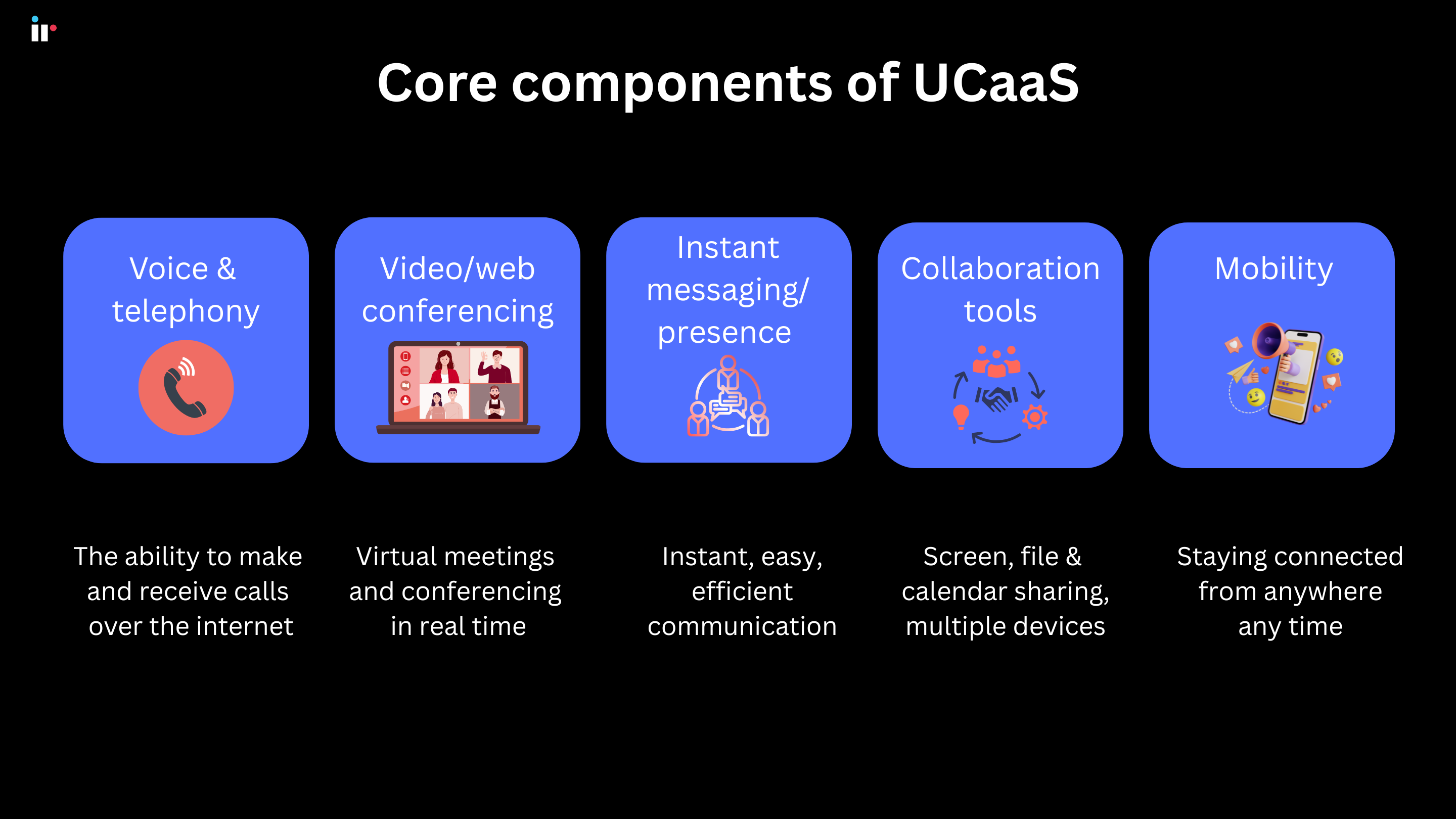
Voice and telephony
UCaaS solutions provide a cloud-based phone service, designed to make and receive calls over the internet, utilizing VoIP (Voice over Internet Protocol) technology. This includes features like call forwarding, call routing, voicemail, and auto-attendants.
Find out more about VoIP testing to ensure your network capabilities
Video/web conferencing
UCaaS platforms are key to real time communication. They provide essential audio and video conferencing capabilities, which enable virtual meetings and collaboration between remote and on-site teams globally.
Features like screen sharing, file sharing, and virtual backgrounds are usually part of a UCaaS platform.
Instant messaging and presence
Instant Messaging (IM) options have become an integral part of communication and file sharing. UCaaS messaging systems are safe and secure, with files stored on managed storage devices rather than personal ones.
They also provide an important presence feature, or the ability to see if users on the platform are available, and the best communications channels to contact them. For example, a presence icon can note if someone is in a meeting or available only via chat. These features make for quicker, more efficient communications over multiple tools.
Instant messaging platforms can also integrate with customer chat functions for better customer support.
Collaboration tools
UCaaS systems include a wealth of collaboration tools that can enhance business communications by working from a variety of devices including laptops, desktops, and mobile devices and shared workspaces.
In addition to web conferencing and video messaging, UCaaS solutions facilitate screen sharing, file sharing, and calendar sharing. UCaaS solutions typically include task and project management features, making them a complete collaboration suite.
Mobility
Business operations are no longer static, and it's imperative that communication and collaboration can happen from any location or device. UCaaS solutions are designed to facilitate remote work from mobile phones, laptops and tablets, meaning that users can stay connected and communicate from anywhere at any time.
How UCaaS Works: The Technology Behind Unified Communications
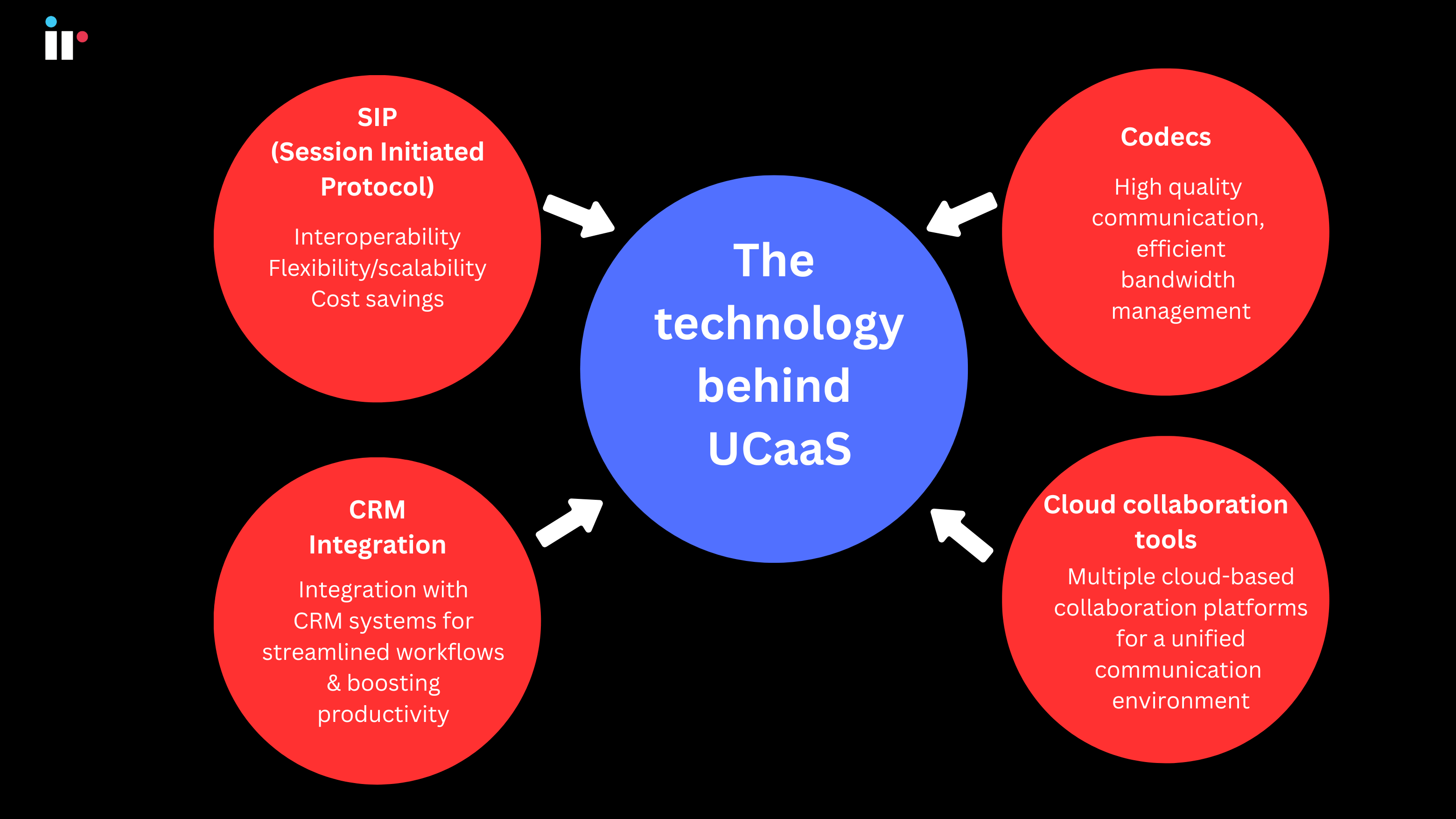
The key technology behind UCaaS solutions enables enhanced business communications and provides a consistent user experience across devices and locations. The componentry that makes this possible includes:
SIP (Session Initiated Protocol)
Universal Session Initiation Protocol (SIP) is a signaling protocol used to establish, maintain, and terminate multimedia communication sessions, including video conferencing and voice calls through a VoIP phone service.
SIP is crucial because it provides:
-
Interoperability - allowing different communication devices and applications to connect and work together, regardless of the vendor or platform.
-
Flexibility and Scalability - SIP trunking,enables businesses to connect their existing phone systems to the public network and scale their communication capacity as needed.
-
Cost Savings - SIP trunking can be more cost-effective than traditional phone lines, as it utilizes the internet for communication
Codecs
Codecs are essential for compressing and decompressing audio and video data, which ensures reliable communication over networks. Codecs handle the conversion of voice and video signals into a format suitable for transmission and then back into usable audio or video at the receiving end. This process ensures high-quality communication while managing bandwidth usage effectively.
CRM Integration
Communications solutions integrate with CRM systems, allowing users to access customer information, initiate calls, and track communication history directly from the CRM interface.
Cloud Collaboration Tools
UCaaS solutions enable integration with cloud-based collaboration tools like Microsoft Teams, Google Workspace and other platforms providing a streamlined and unified environment for communication and collaboration.
Types of UCaaS architectures
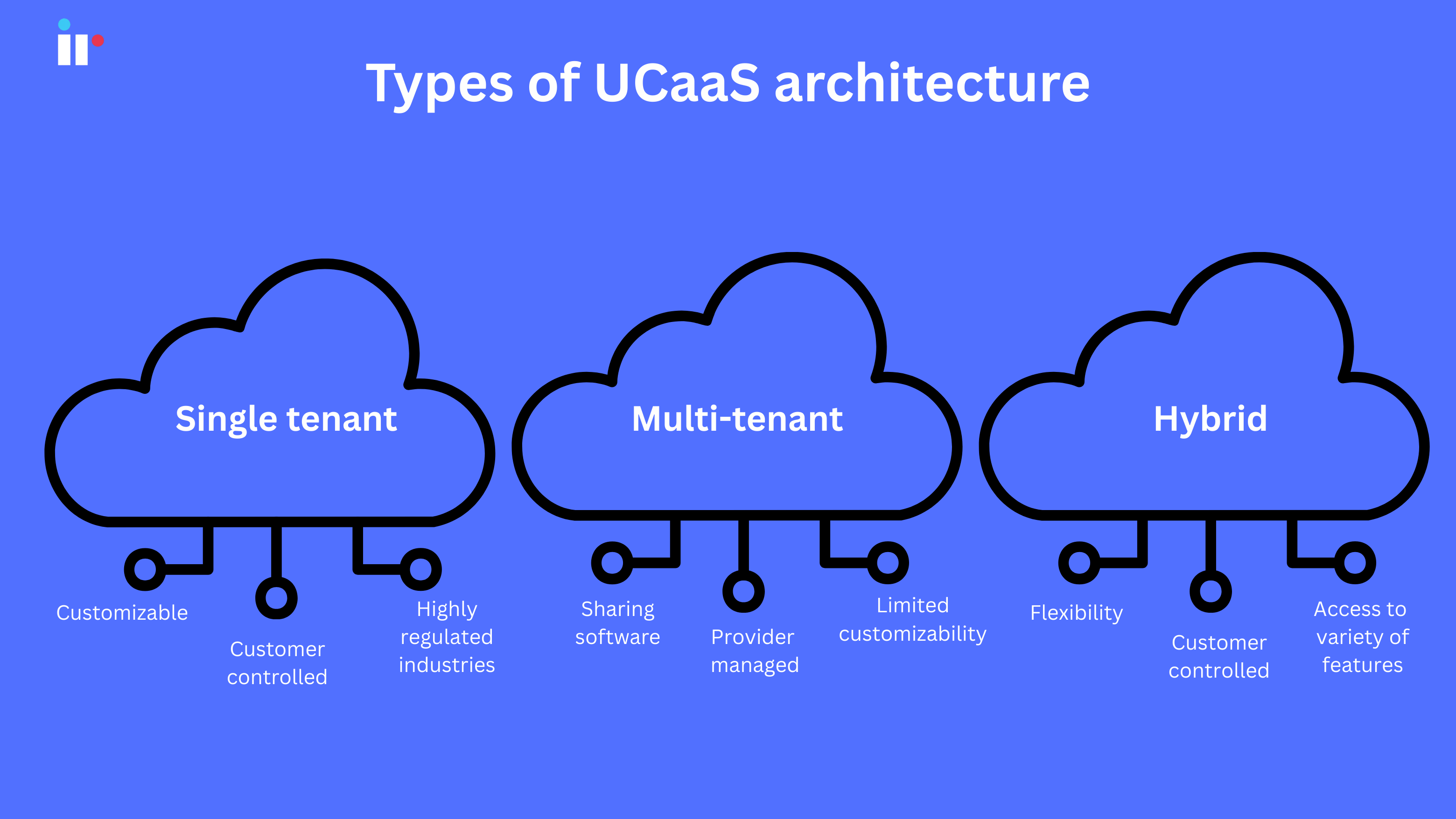
UCaaS has three main architecture types: single-tenant, multi-tenant and hybrid. An organization's choice of UCaaS architecture will depend on factors including security and privacy.
Businesses with significant security and privacy requirements may choose a single-tenant architecture to maintain control over these criteria and data retention. Organizations that need to focus on lower cloud costs, may opt for a multi-tenant or hybrid architecture.
Single-tenant
Single-tenant architecture provides customers with a single, dedicated software platform that can be customized to fits individual needs.
The customer maintains control of the data, where this data resides and what features are rolled out, in addition to security policies and integrations. This type of UCaaS deployment is often used by highly regulated industries, such as healthcare, government and financial services.
Multi-tenant
Multi-tenant architecture allows multiple customers to use the same software platform. This can be cost-effective, but also limits flexibility. Management and security of the platform are handed over to the UCaaS provider.
Updates and maintenance costs are all shared by the tenants, which reduces overall subscription costs as compared with a single-tenant infrastructure. While a multi-tenant architecture enables many UCaaS providers to quickly deploy new features to users, it tends to limit customizability options for individual customers.
Hybrid
In a hybrid UCaaS infrastructure, the UCaaS provider installs the software platform in a customer's network or data center, enabling the flexibility of a single-tenant architecture with access to the variety of features offered by a multi-tenant architecture.
Organizations maintain control over data residency and choose the data they want to keep on internal networks.
UCaaS Implementation: Planning and Best Practices
Implementing a UCaaS solution requires careful planning and execution. A phased rollout, user training, and stakeholder engagement are crucial for a smooth transition
Key best practices include:
-
Conducting a thorough assessment of an organizations needs and business processes. (This includes ensuring that the tools in your UCaaS platform align with your business needs and goals.)
-
Choosing the right provider
-
Planning network readiness
-
Developing a detailed implementation strategy
-
Ensuring security and compliance
-
Providing adequate training and support
-
Monitoring and performance management.
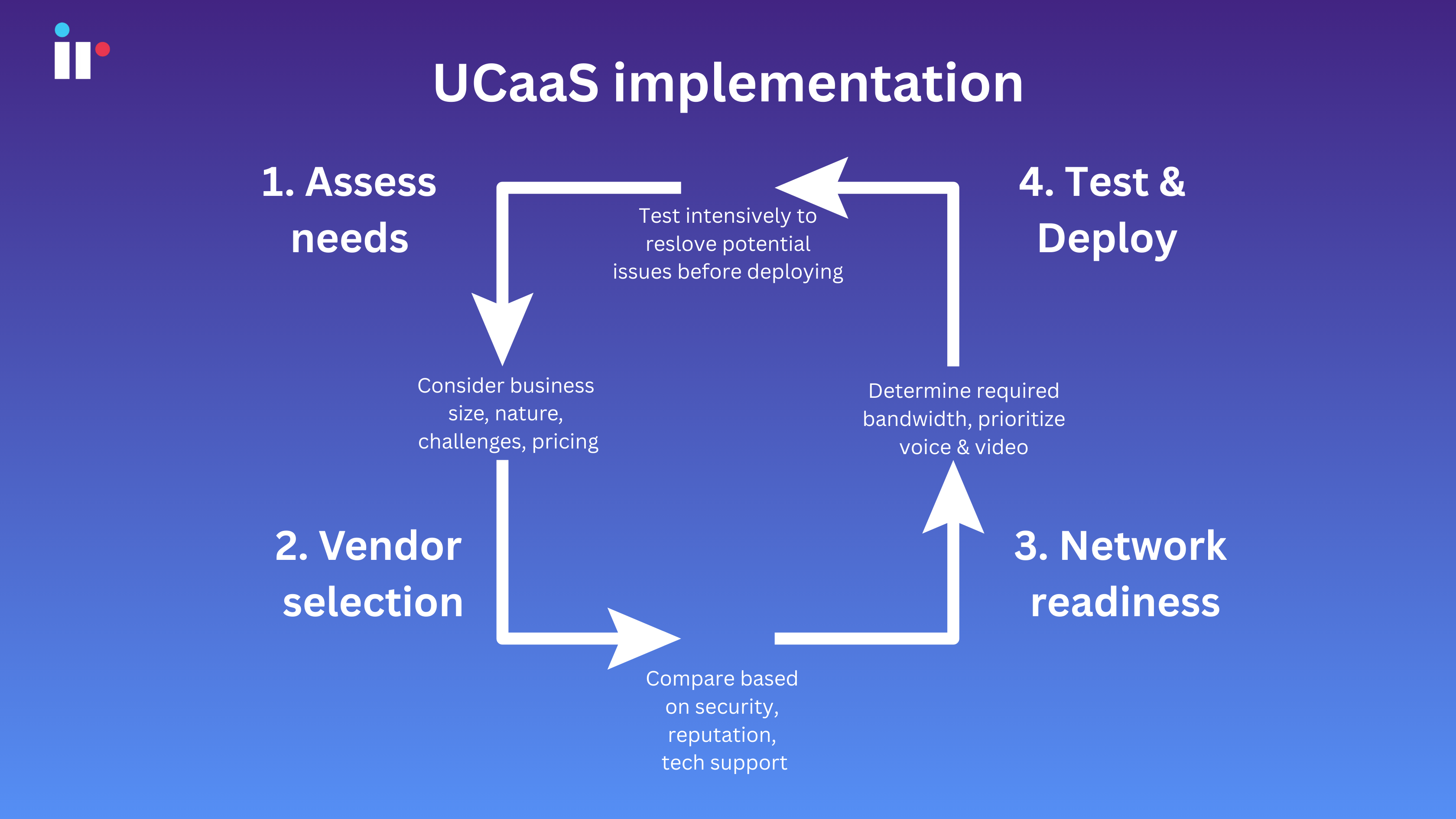
Assessing needs
Assess the specific needs of your enterprise, including the size of your organization, the nature of your business, and any unique communication requirements, challenges or inefficiencies you may have.
Determine whether a single-vendor, multi-vendor or hybrid approach is best for your organization.
Evaluate the pricing structure of top UCaaS providers to ensure a fit for budget. Look for transparent pricing with no hidden fees.
Define objectives, and clearly outline what you hope to achieve by adopting UCaaS solutions, such as improved collaboration, cost savings, or building better customer experience.
Vendor Selection
Evaluate providers by comparing different UCaaS vendors, based on features, pricing, security, and technical support.
Consider integration, and ensure that your existing systems and applications will integrate with what your provider is offering.
Check for scalability, and make sure you choose a solution that can scale with your business needs.
Network Readiness
Assess bandwidth, to ensure your network has sufficient bandwidth and reliable internet connection to handle the increased traffic from UCaaS implementation.
Optimize and configure QoS settings to prioritize voice and video traffic.
Test infrastructure thoroughly to help identify and resolve potential issues early on. This will prevent disruptions to communication services and safeguard sensitive customer data.
The impact of Generative AI on UCaaS
Generative AI is transforming the global UCaaS market by enhancing communication tools - and business communications - with advanced features and ever-evolving efficiencies.
For example, for some time now, AI-powered chatbots and virtual assistants have been improving customer support by handling routine inquiries and routing complex issues to humans.
Almost every leading vendor in the UC and contact center arena has begun introducing generative AI assistants and companions into their platforms. Microsoft has Copilot, Zoom has AI Companion, and Google has Gemini.
-
NLP - The evolution of Natural Language Processing (NLP) enables more sophisticated transcriptions and translation services, creating sentences, revising text, summarizing text, creating text-based responses from inputs, etc., enabling smoother multilingual communication.
-
LLM - These platforms leverage Large Language Models (LLMs) to streamline the operational models, cutting costs and saving time. The use of LLMs within several UCaaS ecosystems including Zoom, Cisco Webex, Google Meet, and Microsoft Teams can streamline workflows.
In addition, generative AI can reduce administrative overhead and increase productivity by automating meeting summaries and actioning item tracking.
Gen AI-driven analytics offers insights into communication patterns and performance, helping businesses optimize their Unified Communication as a Service (UCaaS) strategies. Overall, these innovations make UCaaS platforms more intuitive, efficient, and valuable for organizations.
The main drivers and benefits of UCaaS adoption
At first, UCaaS communication technologies were mainly adopted by SMBs, primarily to save on the costs of on-premises UC, and the proprietary hardware it requires. On-premises communication models also require greater dependency on in-house IT skills for maintenance and management, but eliminating those upfront costs, moves UC budgets from Capex to Opex.
Large enterprises soon realized the increased benefits of adopting UCaaS solutions for business communications. With business technology rapidly developing, more UCaaS solutions are providing a seamless way to improve customer experiences by integrating contact centers or customer relationship management (CRM) tools into the platform.
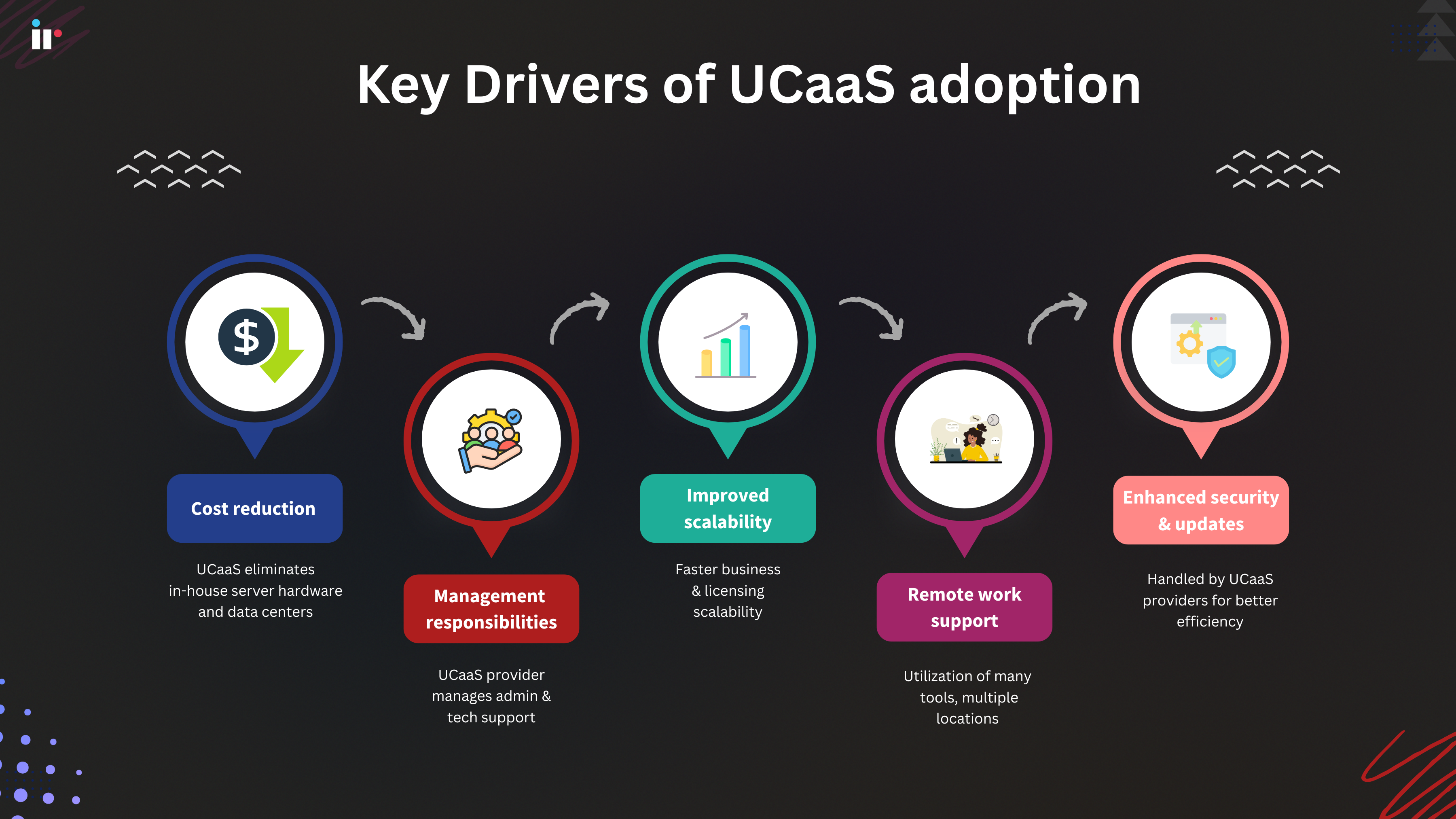
Some of the key UCaaS adoption drivers include:
-
Cost reduction. Organizations can make significant savings by migrating to UCaaS, eliminating the need to buy server hardware or manage in-house data centers.
-
UC management responsibilities. When administration responsibilities shift to the right UCaaS provider, IT teams can focus on other important business-specific technology goals.
-
Improved scalability. Cloud based solutions enable faster and more efficient communications scalability faster. The ability to scale licenses up or down provides organizations with a great deal of flexibility.
-
Support for distributed work. With UCaaS, end users can utilize many communication tools, from multiple locations anywhere in the world, supporting remote workers, and a more streamlined hybrid work environment.
-
Enhanced security and platform updates. Much like management offloading, enterprises can rely on UCaaS providers to handle security maintenance and routine platform updates to protect against software vulnerabilities.
-
Better access to features. In addition to security patching, other UCaaS features are routinely evolving, providing enterprises with a full suite of the most up-to-date communications tools, along with newly added functions like Generative AI.
The critical role of network monitoring in UCaaS
Network monitoring is crucial for unified communications because it provides essential visibility and performance insights into the network, ensuring seamless communication and collaboration experiences for users.
Key UCaaS Monitoring Metrics
-
Voice Quality Metrics: Mean Opinion Score (MOS), jitter, packet loss, latency
-
Video Performance: Frame rate, resolution quality, sync issues
-
Network Performance: Bandwidth utilization, connection reliability, traffic patterns
-
User Experience Metrics: Call completion rates, meeting connection success, feature adoption
With the added complexity of operating from the cloud, network monitoring is even more important for UCaaS, as it gives organizations the tools to proactively identify and resolve issues, optimize network resources, and enhance overall UCaaS performance.
Ensuring optimal performance
-
Real-time visibility - Network monitoring provides clear visibility in real time into network traffic, identifying bottlenecks, latency issues, and other performance problems that can impact UCaaS services. This is vital to avoid potentially costly downtime and streamline communications.
-
Optimizing performance - Monitoring tools can analyze network behavior, allowing organizations to optimize bandwidth allocation, routing protocols, and other network parameters to ensure efficient data transmission and minimize downtime for UCaaS applications.
-
Proactive troubleshooting - Network monitoring tools can proactively detect potential issues before they escalate into major problems, allowing IT teams to immediately address them, and minimize disruptions to unified communications services.
Enhancing security
-
Threat detection - Network monitoring helps identify unusual network activity, such as unauthorized access attempts or malware infections, which can compromise the integrity of internal communication, and the security of UCaaS platforms.
-
Security protocol implementation - Network monitoring tools can help detect security threats, allowing organizations to implement security incident programs and appropriate security protocols to protect sensitive information and prevent data breaches.
-
Compliance - Network monitoring can be a valuable tool to help meet compliance requirements by providing audit trails and reports on network activity. This can alleviate the possibility of hefty fines for non-compliance.
Improving User Experience
-
Reduced downtime - By proactively identifying and resolving issues, network monitoring minimizes downtime, ensuring users can access communication tools without interruption.
-
Faster Problem Resolution - Network monitoring tools provide detailed insights into network behavior, enabling IT teams to quickly diagnose and resolve issues, minimizing the time users are affected by service disruptions.
-
Consistent Performance - Network monitoring ensures consistent performance of UCaaS services across different locations and devices, making sure that users have a reliable communication experience.
Solving common UCaaS monitoring challenges with IR Collaborate
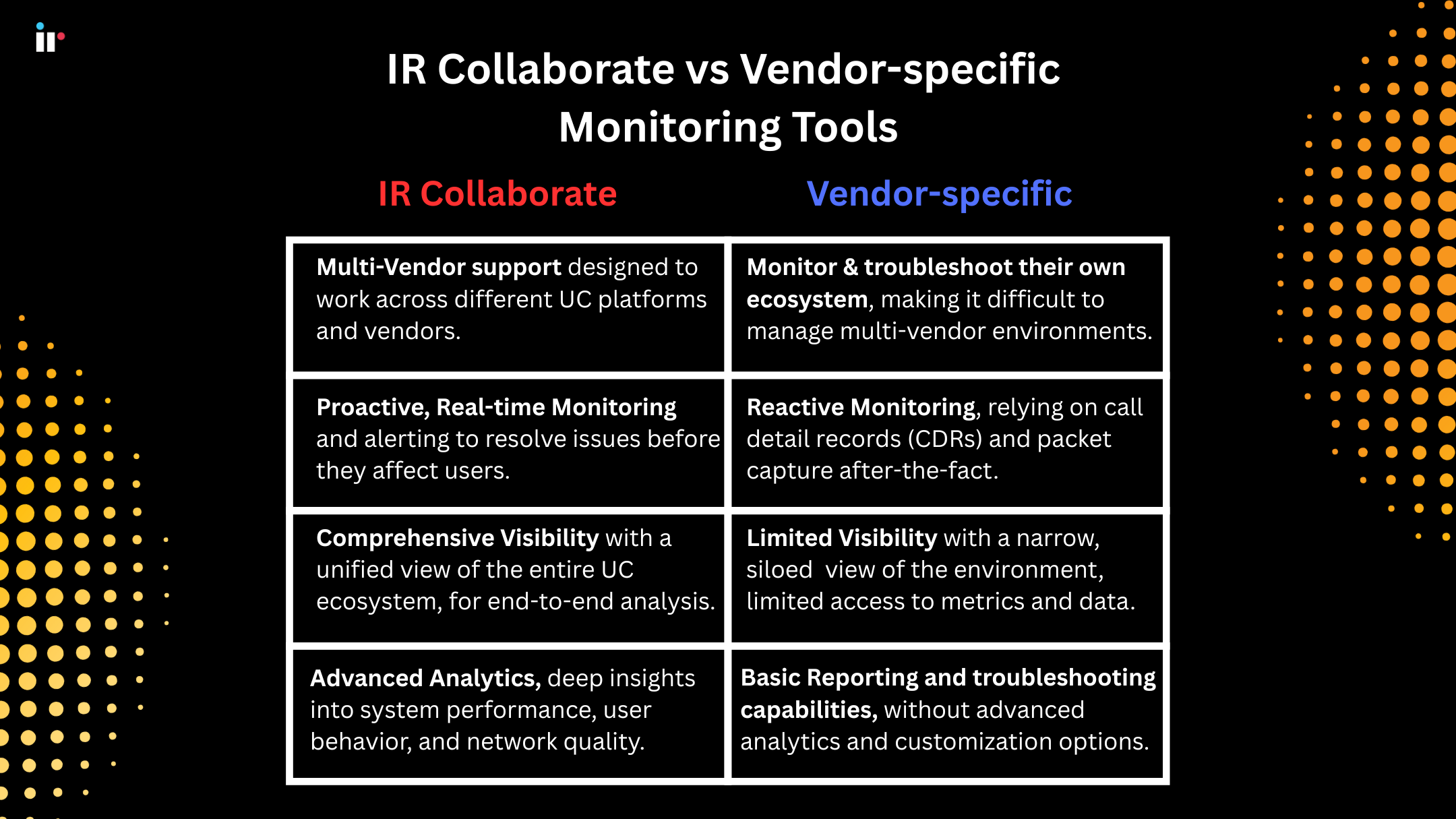
With a seemingly endless array of unified communications platforms, collaboration tools and communication systems, monitoring challenges are many and varied.
Multi-Vendor Environment Complexity
-
Challenge: Disparate monitoring tools create visibility gaps by not providing a comprehensive view of IT infrastructure and application performance. This can lead to potential issues like delayed troubleshooting, missed opportunities for optimization, and increased security risks.
-
IR Collaborate Solution: We provide a unified monitoring platform supporting over 50 UC vendors and multiple communication channels.
Hybrid Cloud Monitoring Difficulties
-
Challenge: Different cloud environments across on-premises and cloud based platforms can create silos, making it difficult to see an organization's ' IT big picture'
-
IR Collaborate Solution: Hybrid cloud environments often require different monitoring tools and approaches for on-premises and cloud-based systems. We provide a single platform for cloud, hybrid, and on-premises environments
UCaaS security considerations and best practices
The sensitive nature of most unified communications ecosystems makes UCaaS platforms attractive targets for cybercriminals.
Eavesdropping, man-in-the-middle attacks, and data interception threats can severely compromise confidential information.
The problems
Common weak points that cyber-criminals exploit include:
-
Data breaches due to the centralization of sensitive data
-
Unauthorized access resulting from weak authentication controls
-
Infiltration by malware and phishing
-
Disruption from Denial-of-Service attacks
-
Vulnerabilities from using unauthorized tools and applications (Shadow IT),
-
Misconfigured APIs
-
Outdated software versions.
Contact Center managers and business CIOs need to ensure their unified communications providers offer robust security measures and that their IT teams have the necessary expertise to maintain their organization's security systems effectively.
The solutions
Some of the key security measures include:
-
Encrypting data both at rest and in transit
-
Using multi-factor authentication
-
Applying strict access controls like role-based access
-
Securing the network with firewalls and intrusion detection systems.
-
Regular software updates and patching to fix vulnerabilities
-
Stringent monitoring and auditing activity to detect suspicious behavior.
-
Secure API integrations when connecting with other applications
-
Voice communications should be secured using protocols like SRTP and TLS.
-
Endpoint security measures, such as device management policies
Frequently Asked Questions
Q: What are the differences between UCaas and CPaas?
-
UCaaS stands for "Unified communications as a service," and provides organizations with an all-in-one suite of internal communication tools. UCaaS is typically used to integrate multiple tools across the enterprise by leveraging cloud-based resources.
-
CPaaS stands for "Communications Platform as a service," and is a collection of communications APIs that can add communications features to other applications. CPaaS technology enables developers to add their own real-time communications features and tools into cloud-based applications without the need to develop and build new back-end infrastructure.
Q: What is Quality of Service (QoS) in UCaaS
QOS in UCaaS refers to the prioritization of network traffic to ensure consistent performance for real-time communications. QoS protocols manage bandwidth allocation, minimize latency and jitter, and prioritize voice and video traffic over less critical data, guaranteeing reliable call quality and seamless user experiences.
Q: How much bandwidth does UCaaS require for optimal performance?
UCaaS bandwidth requirements vary based on communication types and the number of users. Voice calls typically require 100 kbps per user, while video calls need 2-4 Mbps depending on quality settings. For example, organizations with 50 concurrent users should expect approximately 5-10 Mbps for voice-only communications and 100-200 Mbps when including video conferencing.
Q: How secure is UCaaS for business communications?
UCaaS platforms implement enterprise-grade security measures including end-to-end encryption, multi-factor authentication, and compliance with industry standards like GDPR and HIPAA. However, security effectiveness depends on proper configuration and ongoing monitoring. Organizations should implement zero-trust architecture, regular security audits, and network monitoring to detect potential threats.
Q: What are the key features that should be included in a UCaaS platform?
-
Voice: Cloud-based PBX, call management, call routing, and more.
-
Messaging: Instant messaging, SMS, and group chat.
-
Video Conferencing: Integrated video conferencing for meetings and collaboration.
-
Collaboration Tools: File sharing, screen sharing, and other features to facilitate teamwork.
-
Integration with other business applications: UCaaS platforms should integrate with CRM, ERP, and other systems.
Q: How does UCaaS compare to on-premises UC?
-
On-premises UC requires upfront investment in hardware and software, ongoing maintenance, and in-house IT expertise.
-
UCaaS offers lower upfront costs, predictable monthly fees, and reduces the burden on IT staff by handing over responsibilities to a service provider.
Q: Can UCaaS integrate with existing business applications?
Yes, UCaaS platforms offer extensive integration capabilities with popular business applications including CRM systems (Salesforce, HubSpot), productivity suites (Microsoft 365, Google Workspace), and contact center solutions. Most vendors offer pre-built connectors and APIs for custom integrations, enabling features like click-to-dial from CRM records, automatic call logging, and calendar-based meeting scheduling.

.png?width=767&height=450&name=Designer%20(1).png)

-1.png?width=767&height=450&name=cloud-load-performance-testing-tile%20(1)-1.png)