



.png?width=141&height=141&name=Transact%20(1).png)






.svg)

.svg)
.svg)
.svg)


%201.svg)
















Quick answer
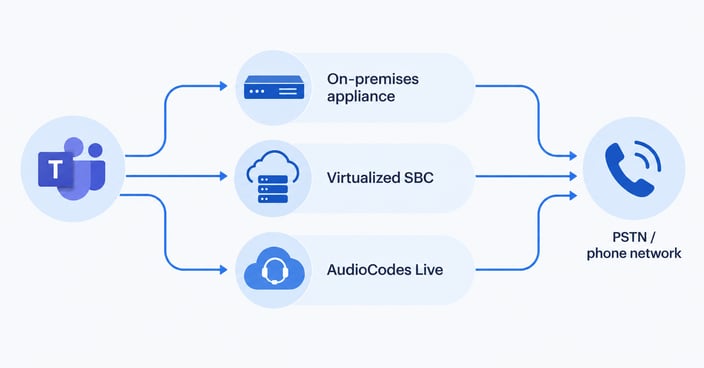
AudioCodes offers three ways to run Microsoft Teams Direct Routing — an on-premises Mediant appliance, a virtualized or cloud-hosted software SBC, and AudioCodes Live, a fully managed voice-as-a-service option. The right choice depends on your session volumes, in-house telecom expertise, and how much operational visibility you need once it's live — not just which option is cheapest to deploy.
Key takeaways
- Certification confirms compatibility, not fit.
AudioCodes' Mediant SBC family is Microsoft-certified for Direct Routing, but that's a starting point, not the decision. - Three deployment paths, three trade-offs.
Appliance, virtualized, and AudioCodes Live trade off control, operational overhead, and cost differently. - Size by sessions, not seats.
Licensing and sizing depend on concurrent sessions — a common mistake in early evaluations. - Direct Routing and Operator Connect aren't the same decision as which SBC to use.
AudioCodes supports routes to both. - Monitoring strategy belongs in the evaluation.
Not as an afterthought once calls start dropping.
Why “AudioCodes is certified” isn’t the same as “AudioCodes is the right fit”
Certification is a compatibility check, not an evaluation.
Microsoft maintains a list of session border controllers (SBCs) certified for Teams Direct Routing, and AudioCodes' Mediant family has been on it for years. That certification tells you the equipment will interoperate with Teams. It doesn't tell you whether an on-premises appliance, a virtualized SBC, or a fully managed service is the right way to run it in your environment.
Most evaluations stop at the certification question and move straight to procurement. That's how organizations end up with a deployment model mismatched to their team's telecom expertise, their session volumes, or their appetite for ongoing operational work — and don't find out until the first outage.
What AudioCodes actually offers for Teams Direct Routing
Three deployment models, not one product.
AudioCodes gives you three distinct ways to connect Teams to the public telephone network, and they aren't interchangeable.
- On-premises Mediant appliance:
A physical session border controller installed and managed in your own data center. You own the hardware, the firmware upgrades, and the day-to-day administration — in exchange for full control over configuration and data residency. - Virtualized or cloud-hosted SBC (Mediant VE):
The same SBC software, deployed as a virtual machine in your own cloud environment or private data center. More deployment flexibility and easier scaling than a physical appliance, but you're still managing it. - AudioCodes Live:
A fully managed voice-as-a-service offering, where AudioCodes operates the SBC infrastructure and you consume Direct Routing as a service. This trades control for reduced operational burden — a meaningful trade for teams without dedicated telecom staff.
| Deployment model | Who manages it | Best fit | Operational overhead |
|---|---|---|---|
| On-premises appliance | Your team | Regulated environments needing data residency and full control | High — firmware, capacity planning, 24/7 monitoring |
| Virtualized SBC (Mediant VE) | Your team | Enterprises with cloud infrastructure and in-house telecom skills | Moderate — same admin burden, more deployment flexibility |
| AudioCodes Live (managed VaaS) | AudioCodes | Teams without dedicated telecom staff, or fast time-to-value needs | Low — but less control over configuration and troubleshooting priority |
The table above isn't a ranking — each model is the right answer for a different environment. What it should do is stop the conversation from starting and ending at “which one is cheapest to license.”
Licensing, sizing, and certification: what to confirm before you buy
The details that get skipped in a rushed evaluation.
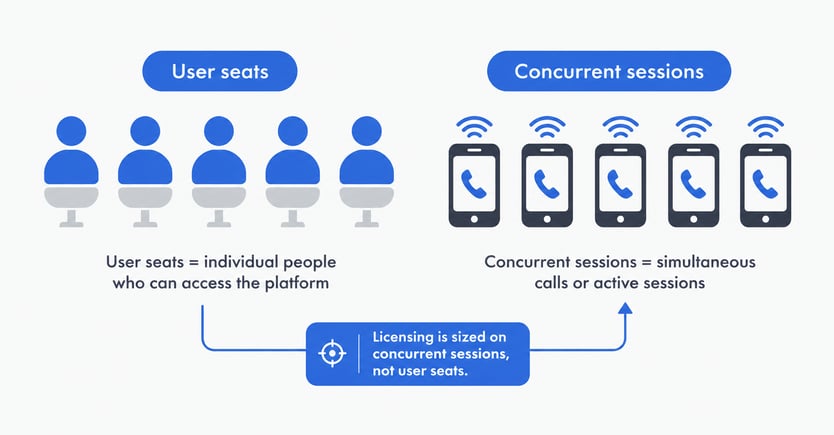
Size by concurrent sessions, not user count. AudioCodes licenses and prices Direct Routing capacity by concurrent call sessions, not by how many Teams users you have. A 5,000-user organization with light calling needs a very different session count than one running a high-volume contact center. Ask your provider for guidance on peak concurrent sessions, not seat totals.
Confirm certification status for your specific model and firmware. Microsoft's certified device list specifies firmware versions, not just hardware models. An AudioCodes appliance running outdated firmware can fall outside certification even if the hardware model is listed — and Microsoft only supports Direct Routing on certified configurations.
Check your Microsoft Phone System licensing separately. Direct Routing requires Teams users to hold a Microsoft Phone System license (bundled in Enterprise E5, or as an add-on to E1/E3), independent of whatever you pay AudioCodes. Confirm this is budgeted before you compare AudioCodes pricing against a calling-plan alternative.
Ask about media bypass support. Where supported, media bypass keeps voice traffic between the SBC and the client instead of routing it through the Microsoft Phone System, reducing hops and improving call quality — worth confirming as part of your technical evaluation, not assuming as standard.
Direct Routing or Operator Connect — does the choice change with AudioCodes?
Two ownership models solving the same problem.
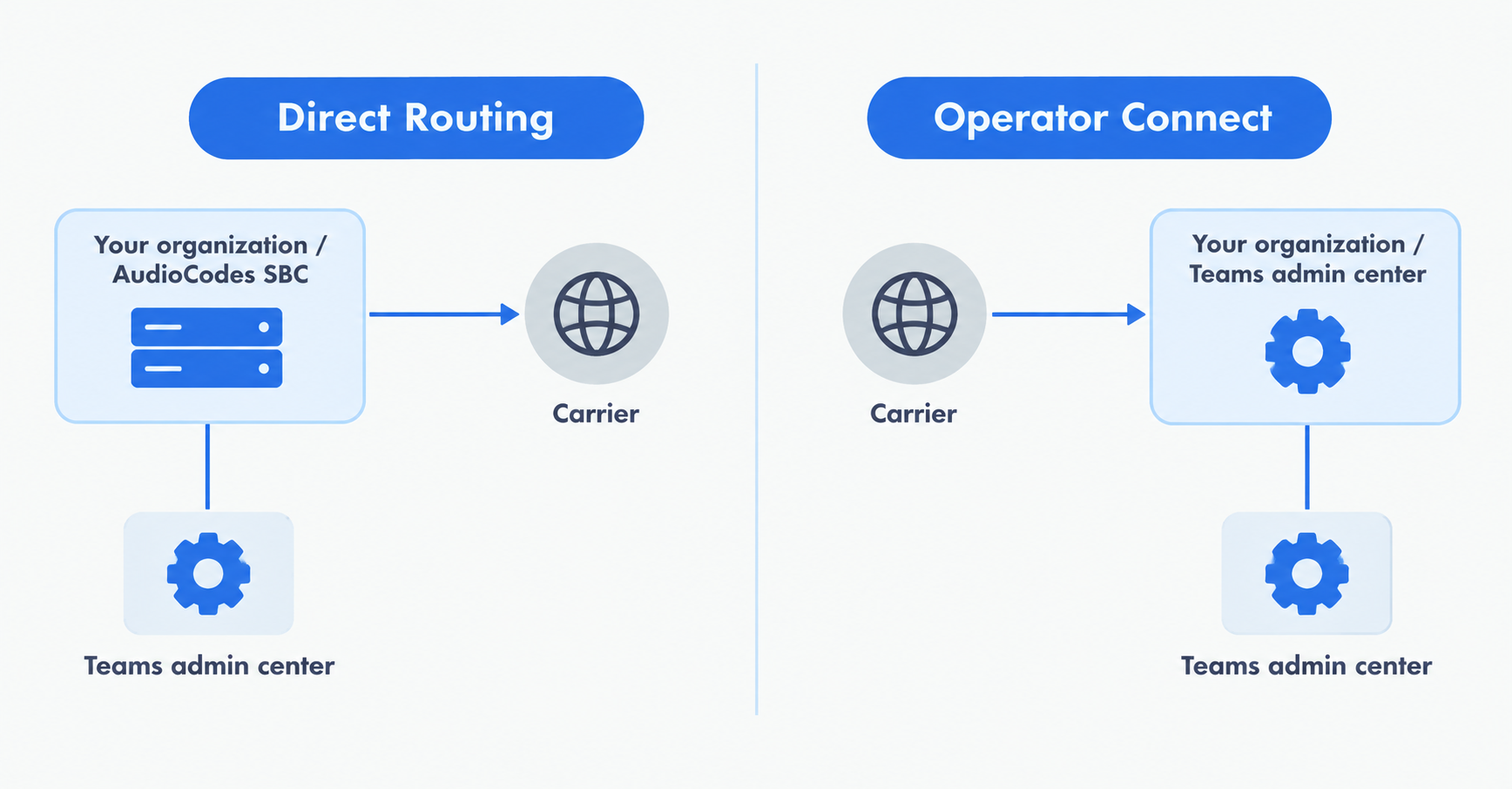
Direct Routing and Operator Connect solve the same underlying problem — connecting Teams to the PSTN — through different ownership models. With Direct Routing, you (or your AudioCodes deployment) own the SBC relationship and configuration. With Operator Connect, a certified carrier manages that connection and integrates it directly into the Teams admin center, reducing your configuration burden further.
AudioCodes supports routes to both models, which means the deployment decision and the ownership decision are separate questions. An enterprise that wants Direct Routing's flexibility but not its administrative overhead can lean toward AudioCodes Live; one that wants the lightest possible touch may prefer an Operator Connect carrier relationship instead. Neither is universally correct — it depends on how much of the telephony relationship you want to own directly.
Evaluation checklist: the questions to answer before you commit
A working framework, not a scorecard to file away.
- Certification:
Is the specific model and firmware version currently on Microsoft's certified Direct Routing list? - Deployment fit:
Does your team have the telecom expertise to manage an appliance or virtualized SBC, or does AudioCodes Live's managed model better match your resourcing? - Capacity:
What are your realistic peak concurrent session numbers, including growth headroom, not just current seat counts? - Geographic and carrier coverage:
Does your SIP trunking provider or AudioCodes Live's carrier network cover every country where you need PSTN connectivity? - Security posture:
Does the deployment support TLS and SRTP encryption, and does it fit your organization's data residency requirements? - Number porting and migration:
How will existing phone numbers move across, and what's the cutover plan if you're migrating from another platform? - Monitoring and observability:
How will you know if call quality degrades — before your users tell you?
That last item is the one evaluations most often skip, and it's the one with the highest operational cost when it's missing.
What most evaluations miss: visibility after go-live
The decision doesn't end at deployment.
An SBC evaluation naturally focuses on getting Direct Routing working. But once it's live, the SBC becomes a real-time, high-throughput component sitting between Teams and your carrier — and it can't be treated as set-and-forget. Certification and licensing decisions are made once; monitoring is a decision you live with every day the deployment runs.
Most AudioCodes-Teams issues that reach a support desk trace back to a small set of causes: certification or firmware mismatches, codec negotiation failures between Teams and the carrier, one-way audio from NAT or media-path problems, or capacity limits being hit during peak periods with no warning. Every one of these is detectable before users notice — if something is watching for it, using the same signaling and media checks that any SIP monitoring strategy needs to catch.
How IR Collaborate can help
One view across your AudioCodes deployment and everything else.
IR Collaborate provides dedicated dashboards for AudioCodes SBC monitoring alongside a vendor-agnostic view across your broader communications ecosystem — so if your Teams environment also touches Cisco, Avaya, or other platforms, you're not switching between separate management consoles to find the fault.
That means visibility into SBC health status, session capacity against your licensed limits, voice quality metrics, and the connection between your AudioCodes deployment and Microsoft's Direct Routing interface — in one place, in near real time. For a deployment decision that's ultimately about avoiding the moment a certified, correctly sized SBC still delivers a bad call because nobody caught the warning signs, that single view is the point.
Frequently asked questions
- Which AudioCodes SBCs are certified for Microsoft Teams Direct Routing? AudioCodes' Mediant appliance and virtualized (VE) SBC families are Microsoft-certified for Direct Routing, but certification applies to specific models and firmware versions. Always confirm your exact configuration against Microsoft's current certified device list before deployment.
- What's the difference between an on-premises Mediant SBC and AudioCodes Live? An on-premises Mediant SBC is hardware you install and manage yourself, giving you full control over configuration and data residency. AudioCodes Live is a fully managed service where AudioCodes operates the infrastructure, trading some control for significantly less operational overhead.
- How is AudioCodes Direct Routing licensed? AudioCodes licenses SBC capacity by concurrent call sessions, separate from the Microsoft Phone System license each Teams user needs for calling. Size your evaluation around peak concurrent sessions, not total user count.
- Should we choose Direct Routing or Operator Connect with AudioCodes? Both connect Teams to the PSTN; the difference is who manages the relationship. Direct Routing gives you (or AudioCodes Live) more control over configuration, while Operator Connect shifts management to a carrier integrated directly into the Teams admin center.
- What typically causes call quality problems in an AudioCodes Teams deployment? The most common causes are certification or firmware mismatches, codec negotiation failures, one-way audio from NAT issues, and session capacity limits reached during peak periods — all detectable with proactive monitoring.
- Does choosing AudioCodes lock us into a single vendor? No. AudioCodes SBCs are built for multi-vendor interoperability, and most enterprises running Teams also run other UC or contact center platforms. The deployment decision doesn't have to dictate your broader monitoring or vendor strategy.
- Do we need a session border controller if we use AudioCodes Live? Yes — AudioCodes Live still uses SBC infrastructure to connect Teams to the PSTN. The difference is that AudioCodes operates and manages it for you rather than your team running the equipment directly.
- How long does an AudioCodes Direct Routing evaluation typically take? Timelines vary by deployment complexity, but organizations that evaluate deployment model, licensing, and monitoring strategy together — rather than sequentially — typically move from evaluation to live deployment faster than those that revisit the decision after choosing a model.