


.png?width=141&height=141&name=Transact%20(1).png)






.svg)

.svg)
.svg)
.svg)


%201.svg)


















Unified communications (UC) means bringing an organization’s voice, video, messaging, and conferencing tools into one consistently managed environment, whether that environment runs on-premises, in the cloud as UCaaS, or across both in a hybrid model.
Evaluating a UC solution means testing more than what it can do on day one. It means confirming you can still verify it’s working once it’s running across every vendor and location your business depends on.
This guide explains what unified communications actually covers, where UCaaS fits, which evaluation criteria matter most, how on-premises, cloud, and hybrid models compare, and why multi-vendor visibility should be part of the decision before a contract is signed.

What unified communications means and where UCaaS fits
Unified communications is the umbrella term for bringing an organization’s communication channels, including voice calling, video conferencing, instant messaging, presence, and file sharing, into one consistently managed environment rather than a patchwork of disconnected tools bought at different times for different teams. The goal is not a single app. It is a single, predictable experience, regardless of which channel or device someone is using to connect.
Unified Communications as a Service, or UCaaS, is one way to deliver UC: a cloud-hosted, subscription model where the vendor manages the underlying infrastructure. It is not a synonym for UC itself. UC is the category. UCaaS is one deployment option inside it, alongside on-premises and hybrid models.
That distinction matters at evaluation time. A vendor pitching unified communications might mean a fully on-premises PBX-based system, a pure UCaaS platform, or something hybrid. Each comes with a different set of trade-offs for control, cost, and reliability. Confirming which one you are actually being sold, before comparing features, is the first step in a real evaluation.
If UCaaS is already the direction you are leaning, see the UCaaS guide for a deeper look at the cloud-delivery model.
Why evaluating unified communications solutions is harder than a feature checklist
The global unified communications market is projected to grow significantly through 2030, which means more vendors, more platform combinations inside a single enterprise, and more organizations running genuinely mixed environments. That makes evaluation more complex, not less.
Most guidance on choosing a UC solution converges on the same list: security, integration, scalability, cost, and vendor support. None of that is wrong. A solution that fails any one of those points is a legitimate reason to walk away. But a checklist evaluated once, before a contract is signed, only confirms whether a platform can theoretically do the job. It does not confirm what happens after go-live.
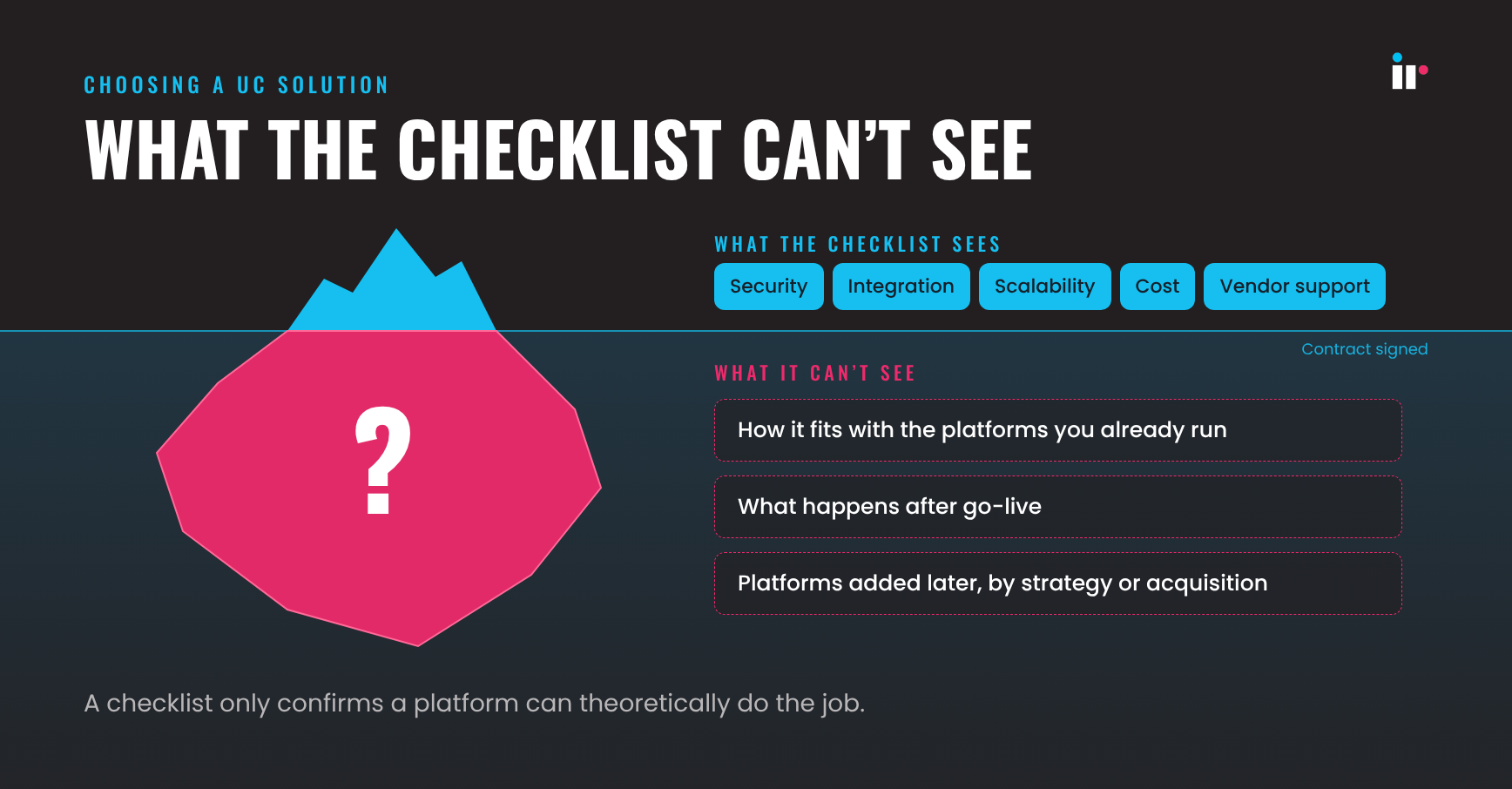 Consider a multi-site retailer migrating to Teams in newer stores while an older Avaya deployment still runs the contact center in established markets. Six months into the rollout, agents start reporting dropped calls during peak trading hours. The first question, whose problem is this, does not have a clear owner because no single vendor dashboard covers the platform it is not selling. One vendor may show its own environment is healthy. Another may show the same. Neither may show what is happening at the point where the two environments meet, or whether the underlying network is the actual cause.
This is the gap a feature checklist cannot close. It evaluates a platform in isolation, not the environment it is about to join. For any enterprise running more than one UC or collaboration platform, whether by strategy or acquisition, the evaluation has to account for what happens after go-live, not only what is promised beforehand.
The six evaluation criteria that predict long-term success
Build your evaluation around these six criteria. The first five are standard due diligence. The sixth is the one most buying guides skip, and it is the one that determines whether the other five hold up in practice.
-
Security and compliance: Confirm encryption in transit and at rest, multi-factor authentication, and alignment with the standards your industry requires, such as HIPAA, GDPR, SOC 2, or comparable frameworks. A UC platform touches every conversation in the business, so a gap here is a business risk, not just an IT finding.
-
Integration with your existing stack: Check for published APIs and confirmed compatibility with the CRM, ticketing, and collaboration tools your teams already rely on. A UC solution that forces teams out of their existing workflow tends to get adopted only partially.
-
Scalability: Confirm the platform can absorb rapid onboarding, seasonal call volume spikes, and new-site rollouts without forcing a re-architecture. Growth should not require a second evaluation 18 months later.
-
Reliability and SLAs: Ask for the actual uptime guarantee, mean time to restore commitments, and what redundancy and failover look like in the contract, not just in the sales deck.
-
Cost transparency: Request an itemized quote covering seats, support tiers, integration work, and regional variation rather than relying on published list pricing. Enterprise UC pricing rarely matches the rate card once compliance and integration requirements are factored in.
-
Multi-vendor visibility: Confirm you can see call quality, availability, and performance data across every platform in your environment, not only the one under evaluation. This is the criterion that helps a team catch a degrading connection before a customer does, no matter whose infrastructure it sits on.
How to run the evaluation, not just build the criteria
A criteria list only produces a good decision if the process around it is structured to test what matters most for your environment.
Weight the criteria before you compare vendors. A healthcare provider bound by HIPAA will weight security and compliance differently from a fast-scaling retailer that prioritizes cost and deployment speed. Decide the weighting internally, with input from IT, security, and the business units that depend on the platform daily, before a single vendor demo.
Pilot against your actual environment, not the vendor’s demo environment. A platform performs differently in a controlled demo than it does alongside the Cisco estate, the Avaya contact center, and the SD-WAN configuration you already run. Where possible, pilot the shortlisted solution inside a segment of your real multi-vendor environment, not an isolated sandbox.
Put the multi-vendor visibility check inside the pilot itself. Do not treat visibility as a criterion to confirm on a spec sheet. Test it. During the pilot, confirm you can actually see performance data across the new platform and the existing ones side by side. If that visibility does not exist during the pilot, it will not materialize after the contract is signed.
On-premises, cloud, and hybrid unified communications models
The right unified communications solution depends on where you deploy it as much as what it can do.
-
On-premises: This model offers full control over infrastructure and configuration. It usually comes with higher upfront capital cost and slower scaling across new sites, but it can suit regulated industries and organizations with strict data residency requirements.
-
Cloud (UCaaS): In this model, the vendor manages infrastructure and updates. It usually lowers upfront cost and speeds deployment, but it also means less control over the underlying network path. It often fits distributed workforces that prioritize speed and lower operating overhead.
-
Hybrid: This model keeps some sites or functions on-premises while others move to the cloud. It is common for enterprises in migration or for organizations balancing regional regulatory needs with flexibility. The trade-off is that hybrid environments require coordinated visibility across both sides.
None of these models is inherently the right choice. Each is a legitimate answer to a different constraint, and large enterprises frequently run more than one at once across regions or business units. For a closer look at this mix, see Hybrid UC in 2026.
The unified communications tools that make the decision easier
The word "tools" gets used two different ways in a UC evaluation, and conflating them is a common mistake.
The first meaning is the platforms themselves: Microsoft Teams, Cisco Webex, Avaya, and Oracle are the tools many large enterprises are already running, often several at once. Evaluating them means applying the six criteria above to each platform under consideration while being honest about which systems are already embedded in the business and unlikely to be fully replaced in the current cycle.
The second meaning is the tooling used to evaluate and monitor those platforms once they are live: the observability layer that shows call quality, session data, and infrastructure health across whatever combination of platforms is actually in use. This second category rarely gets enough budget attention during the buying process because it is not the platform being purchased. It is the layer that proves the purchase is working. For more on that, see this guide to monitoring UCaaS calls.
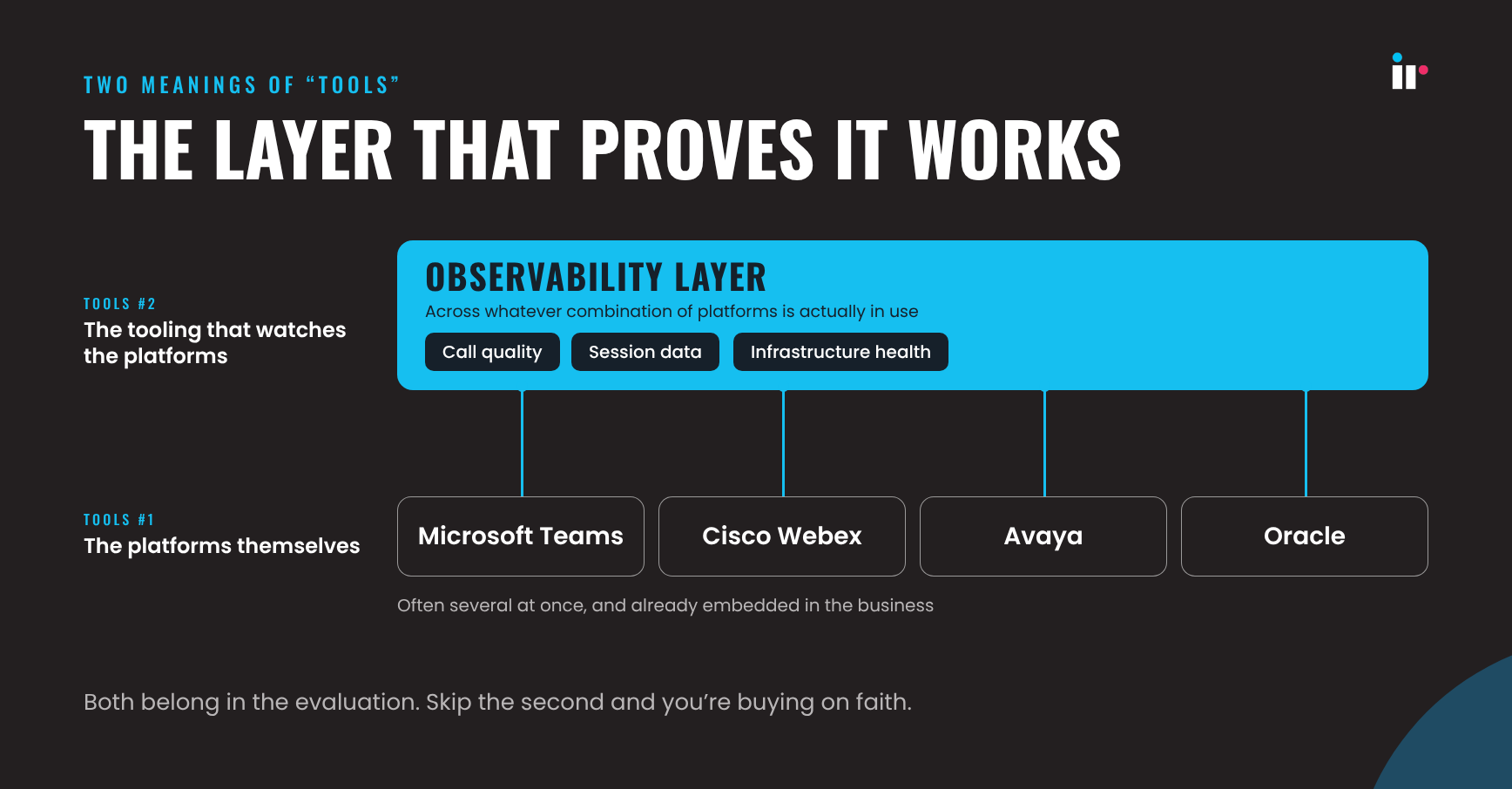
Both categories belong in the evaluation. A unified communications solution chosen without a plan for the second one is a decision made on faith that the first six months in production will look like the pilot did.
What to plan for after you choose
Choosing the solution is the output of the evaluation, not the end of the work. Whichever model you land on, the migration itself needs the same observability discipline: readiness checks before cutover, a phased rollout rather than a single switch for the whole business, and continuous monitoring across old and new platforms until the transition is complete.
Retiring the old environment too early, before performance across the new one is confirmed at scale, is one of the more common ways a well-evaluated decision still produces a rocky rollout. For the broader migration process, see the UCaaS migration guide.
How IR Collaborate supports the evaluation and the decision
IR Collaborate, powered by Prognosis, gives teams real-time visibility across unified communications and contact center environments, including Microsoft Teams, Cisco, Avaya, and Oracle, whether they are deployed on-premises, in the cloud, or across a hybrid environment.
For a UC evaluation specifically, that means the multi-vendor visibility criterion does not have to wait until after a new platform goes live. Collaborate’s enterprise UC capabilities let teams baseline current call quality and performance before a migration begins, then continue monitoring across old and new platforms throughout a phased rollout so a degrading connection gets caught and attributed to its actual cause instead of getting lost in the gap between two vendor dashboards.
Iris, the AI-powered assistant built into Prognosis, adds another layer by surfacing the anomalies and patterns worth investigating first so teams are not manually correlating data across platforms to find them.
If you are building your own evaluation criteria, the UC/CC Observability Calculator offers a quick way to baseline where your current environment stands before you compare it against anything new.
Frequently asked questions
Conclusion
Vendors selling unified communications platforms usually frame the decision as a feature comparison because that is the part of the sale they control. But the decision that holds up is not the one with the longest checklist. It is the one you can still verify is working 18 months in, across every platform you are actually running, not only the one you picked.
Build multi-vendor visibility into the evaluation from the start, and the rest of the criteria, from security and integration to scalability and cost, become easier to hold every vendor to before and after the contract is signed.
See where your current UC environment stands before you evaluate anything new with the UC/CC Observability Calculator,
or get a demo to see how IR Collaborate gives teams multi-vendor visibility across Teams, Cisco, Avaya, and Oracle in any deployment model.