



.png?width=141&height=141&name=Transact%20(1).png)






.svg)

.svg)
.svg)
.svg)


%201.svg)
















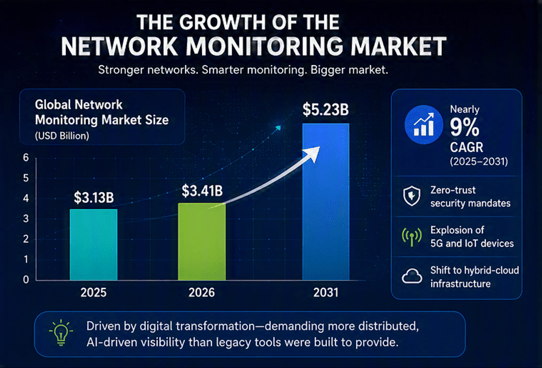

The growth of the network monitoring market
According to Mordor Intelligence, the global network monitoring market is projected to reach USD 5.23 billion by 2031.
In 2025 it was valued at $3.13 billion, and on track to hit $3.41 billion in 2026. This represents a compound annual growth rate of nearly 9%. That growth is being driven by zero-trust security mandates, the explosion of 5G and IoT devices, and the shift to hybrid-cloud infrastructure — all of which demand more distributed, AI-driven visibility than legacy tools were built to provide.
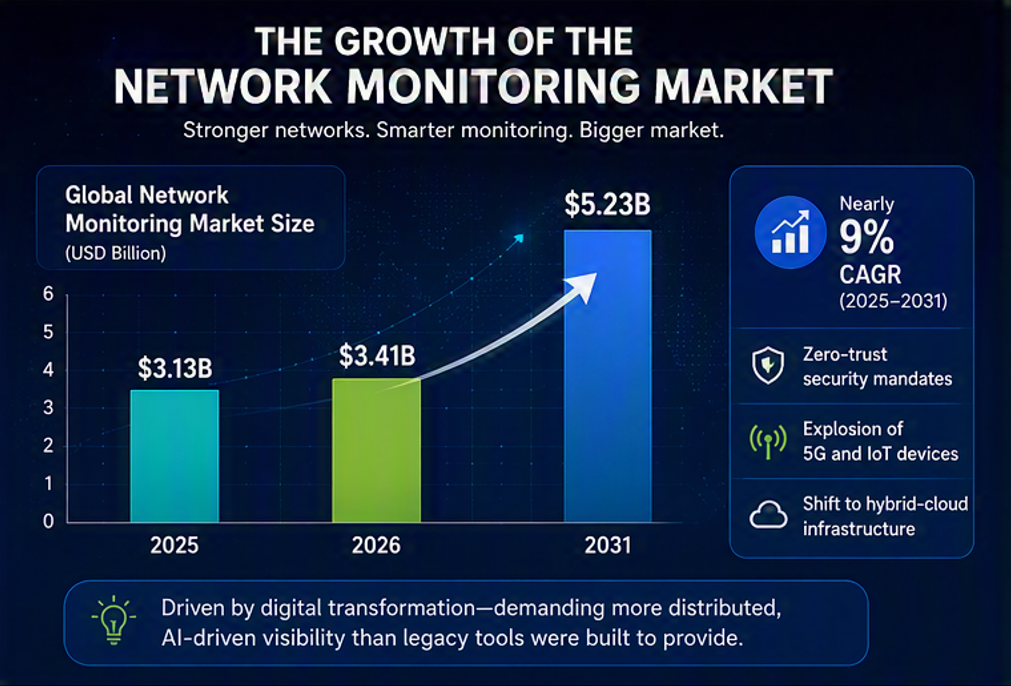
What are network monitoring tools?
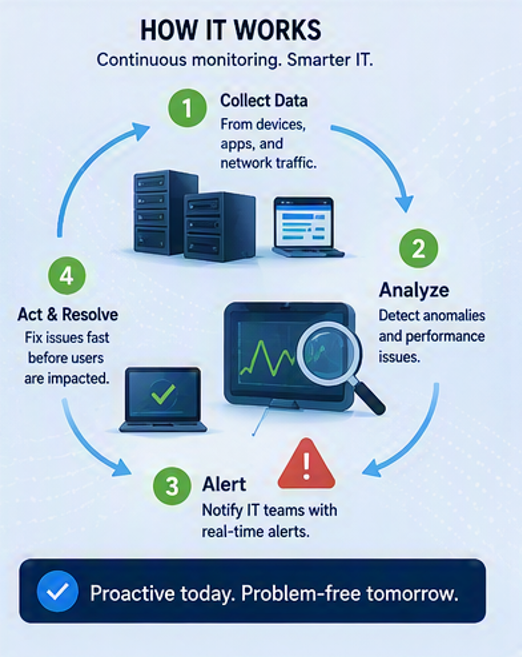
Network monitoring tools are software solutions that continuously track the performance, availability, and security of an organization's network, including its devices, traffic, and infrastructure.
Using a centralized platform, they alert IT teams to problems such as outages, latency, or security threats before those issues cause malfunctions and failures. Monitoring Tools are essential for organizations to provide optimal network performance, reduce downtime and protect business-critical services.
As a proactive strategy for IT success, they reveal real-time data and performance metrics, including device status, network traffic, and potential issues that require attention. Without this data analysis, it would be almost impossible to run an organization these days.
In this comprehensive guide, we'll reveal exactly what network monitoring software does, and why it's necessary to invest in tools that can adapt, and scale with your organization as it grows and changes.
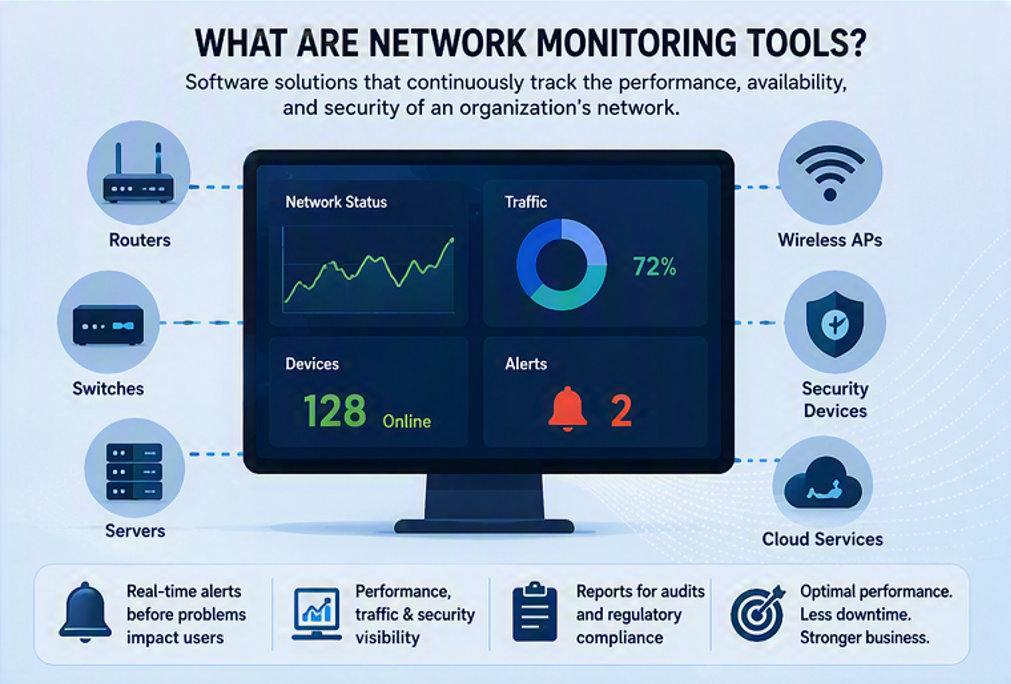
Why you need network monitoring tools
Think of network monitoring tools as the dashboard of a car. A dashboard tracks speed, fuel, battery, and engine health continuously, so a driver catches a problem long before it becomes a breakdown. Driving without one is hard to imagine, and running a modern network without an equivalent is just as risky.
As networks have grown more distributed, more cloud-connected, and more central to daily operations, that dashboard view has gone from a nice-to-have to a non-negotiable.
These tools track every SNMP-enabled device on a network. They provide visibility into network devices from routers switches and servers, to wireless access points, and more, continuously assessing performance, security, and efficiency.
Instead of hearing about a problem from a frustrated employee or customer, IT teams see it first, and can often resolve it before anyone else notices. Network monitoring tools also generate reports that support audits and regulatory compliance.
Our aim is to provide enough information in this guide to enable organizations to make informed decisions about the best network monitoring solution. Whether it's on-premises or cloud infrastructure monitoring, network monitoring solutions are about proactively protecting and maintaining not only your network devices, but every component of your entire network infrastructure.
Network performance optimization
Modern network monitoring software tracks even the largest enterprise networks around the clock, spotting issues like high latency, packet loss, and inefficient bandwidth use before they affect operations. Performance baselines help to spot anomalies and bottlenecks in network behavior, tracking bandwidth usage, memory usage, while historical performance data aids in capacity planning and forecasting resource requirements.
This proactive approach matters most for organizations juggling multiple networks, dispersed workforces, and a long list of approved (and unapproved) devices. Catching problems early means faster troubleshooting and less downtime, which keeps the business running smoothly as it grows. Here's what that looks like in practice:
- Continuous, 24/7 monitoring
- Bandwidth analysis and tracking
- Load balancing for efficiency
- Reduced jitter and improved Quality of Service (QoS)
- Capacity planning for smarter traffic engineering
- Automated discovery and better event management
- A significant reduction in routine maintenance tasks
Network security
Cybersecurity threats like malware, DDoS attacks and data breaches are growing more frequent and more sophisticated. Real-time monitoring helps IT teams spot unauthorized access or suspicious activity early, so they can act before a minor incident becomes a major one. Security monitoring detects unauthorized access and unusual data flows.
If a breach does happen, detailed logs and reports help teams respond quickly, limit the damage, and support post-incident analysis. Network monitoring tools also help organizations:
- Detect threats earlier through real-time visibility
- Meet data protection and security regulations with automated alerts
- Execute disaster recovery plans faster
- Demonstrate compliance during audits
Cost efficiency
Downtime is expensive, and recent research backs that up.
Uptime Institute's 2026 Annual Outage Analysis found that 57% of organizations experienced a major outage costing more than $100,000. And for the second year running, one in five outages cost more than $1 million.
Separately, ITIC's Hourly Cost of Downtime research found that the large majority of organizations now put the cost of a single hour of downtime above $300,000, with over 40% of mid-to-large enterprises reporting hourly costs between $1 million and $5 million or more.
Forewarned is forearmed. Network monitoring tools flag anomalies early with customizable alerts. This reduces the downtime that drives these costs across every industry, from finance and healthcare to retail and government.
There's a second cost benefit too: better visibility into how hardware and software resources are actually being used, increasing operational efficiency. This helps organizations avoid over-purchasing capacity, flags under-utilized resources, and ensures existing infrastructure is allocated where it's genuinely needed.
User experience and productivity
When critical applications and services are properly monitored, employees and customers get uninterrupted access to the resources they rely on, and this becomes a major factor in both productivity and satisfaction.
Catching issues early, and resolving them faster, means IT teams can fix problems before users ever notice them. That reduces pressure on help desk teams too, meaning fewer escalations, faster resolutions, and less need to pull in specialist engineers for basic troubleshooting.
Through a centralized management console, good monitoring tools also help isolate exactly where a problem originates, whether it's the user's device, the network, or the application itself, cutting diagnostic time significantly.
Enhanced visibility and control
Network performance and user satisfaction are directly tied to business outcomes, which is why the ability to extract meaningful intelligence from network data matters so much. Complete visibility means organizations retain control over their data, wherever it flows.
The best tools provide one comprehensive view across remote devices, and networking equipment, showing traffic patterns on the network. This enables better management and more informed decisions, as more organizations shift to hybrid and cloud environments. It's critical that visibility extends across both on-premises and cloud infrastructure.
Leading platforms can also automate responses to specific conditions, such as restarting a service or rerouting traffic, and help secure remote connections and VPNs for distributed teams.
Key features to look for: Basic vs. enterprise tools
Not every network monitoring tool does the same job. Simpler tools cover the basics; enterprise-grade platforms go much further. Customizable dashboards allow tailored network monitoring experiences. Cloud infrastructure monitoring ensures performance of cloud services.
More basic tools are built to handle a single local network well, but they can struggle once you add multiple sites, remote offices, or thousands of devices. The right choice depends on your organization's size, complexity, and growth plans.
|
Feature |
Basic Tools |
Enterprise Tools |
|
Monitoring scope |
Uptime, device status, bandwidth, CPU/memory |
Full infrastructure, APM, traffic analysis, network mapping |
|
Alerting |
Simple, threshold-based alerts |
Automated, rule-based responses and remediation |
|
Metrics & analytics |
Device uptime, ping results |
Root cause analysis, predictive modeling, Deep Packet Inspection (DPI) |
|
Scalability |
Limited devices and sites |
Thousands of devices across multiple regions |
|
Interface |
Simple, low technical barrier |
Customizable dashboards, drill-down detail |
|
Reporting & compliance |
Basic health reports |
Tailored reports for GDPR, HIPAA, PCI-DSS |
|
Customization & integration |
Pre-built templates |
Full customization, API integration with SIEMs and help desks |
Whichever tier fits today, look for a tool that can grow with you. Organizations often outgrow a basic tool faster than expected, and migrating monitoring platforms mid-growth is disruptive.
Types of network monitoring tools
There are multiple vendors and hundreds of network monitoring tools on the market, generally falling into two categories: open-source and free tools built for smaller networks or tighter budgets, and enterprise-grade platforms built for scale, automation, and dedicated support. Most modern monitoring platforms support protocols such as SNMP NetFlow and ICMP.
Gartner Peer Insights, which aggregates verified user reviews across the infrastructure monitoring tools category, is a useful independent benchmark once you've narrowed down a shortlist, worth checking alongside vendor spec sheets before you commit.
Popular network monitoring tools include SolarWinds Datadog Zabbix and ManageEngine.
Network Monitoring Tools at a Glance
|
Tool |
Type & Best For |
|
Nagios |
Open-source. Budget-conscious teams monitoring small-to-mid-sized networks. |
|
Zabbix |
Open-source. Free monitoring with strong community support and broad protocol coverage. |
|
SolarWinds Network Performance Monitor |
Enterprise. Broad network performance monitoring at scale. |
|
Paessler PRTG |
Enterprise. All-in-one monitoring with flexible, sensor-based licensing. |
|
ManageEngine OpManager |
Enterprise. Multi-vendor network and IT infrastructure monitoring. |
|
IR Collaborate |
Enterprise. Multi-vendor UC, contact center, and payments environments needing deep, end-to-end observability. |
Open-source tools like Nagios and Zabbix can monitor over 100,000 devices in enterprise environments. They claim to keep costs low but require more manual configuration, and typically offer thinner cloud monitoring and enterprise support.
Enterprise platforms cost more but deliver real-time analytics, automation, large-scale deployment support, and dedicated technical support , with IR Collaborate purpose-built for organizations managing complex, multi-vendor communications and payments environments.
RMM tools vs network monitoring tools
It's worth distinguishing network monitoring tools from RMM (Remote Monitoring and Management) software, since the two are often mentioned together but solve different problems.
Network monitoring tools focus on the health and performance of the network itself, operating systems, wireless devices, traffic, infrastructure.
A remote monitoring and management solution, by contrast, is built for IT teams and managed service providers to remotely monitor, manage, and maintain client devices and endpoints, automating tasks like patching and routine maintenance across dispersed environments. Here's what else RMM software does:
- Over time, RMM software collects data about devices, including their performance, hardware status, network information, and operating systems.
- Unified dashboards mean your team has fast remote access to critical information, allowing them to complete tasks, and deliver faster service to clients.
- Automated alerts notify IT departments about performance issues or outages through email or SMS.
- RMM solutions allow remote management of thousands of IoT sensors.
- They can also perform upgrades and patch management to make certain that all networked devices are secure.
- RMM technology removes the need for on-site visits, which helps to reduce costs and downtime.
For a closer look, see our guide on RMM software.
How to choose the right network monitoring tool
Choosing a network monitoring tool means balancing needs against cost. More features isn't always better, but cutting corners on budget can leave dangerous gaps. Start with your organization's actual needs:
- Network size and complexity: Do you need basic bandwidth tracking, or a tool that scales across thousands of devices and multiple locations?
- Cloud or hybrid environments: On-premises setups need less cloud monitoring; hybrid and cloud environments need deeper visibility and analytics.
- Performance vs. security priorities: Performance-focused organizations need strong traffic, SLA, and APM monitoring; security-focused organizations need intrusion and anomaly detection.
- Compliance requirements: Regulated industries (HIPAA, GDPR, PCI-DSS) need audit trails and compliance reporting built in.
Then weigh the budget model. Open-source tools suit tight budgets but require manual upkeep. Subscription pricing scales with usage but can grow expensive over time. Perpetual licenses avoid recurring fees but carry higher upfront costs.
Whichever model you choose, factor in total cost of ownership, including maintenance, upgrades, training, and support, rather than just the sticker price.
Case studies: Network monitoring in action
Network monitoring is a proactive strategy for IT success, not a process of reactive troubleshooting. Here's how three organizations have put it to work with IR Collaborate.
Texas Tech University System
Before adopting IR Collaborate, Texas Tech University System struggled to proactively monitor its unified communications ecosystem - network devices, phones, and call routing, often learning about issues only after customer complaints. Assistant Managing Director of Communication Services Richard Pickens needed a solution with better visibility and proactive monitoring.
With IR Collaborate, his team gained comprehensive visibility into core infrastructure, routing engines, and session managers, catching anomalies early and keeping traffic flowing smoothly.
As Pickens put it:
"We use IR Collaborate to monitor pretty much everything that we have."
Snohomish County Public Utility District (PUD)
The 12th-largest public utility in the US needed to ensure its 370,000 customers could reliably reach a new IVR system, especially with winter approaching and lines likely to be flooded with outage reports. Senior Project Manager Kristi Sterling's team turned to IR Testing Solutions to validate call handling, voice quality, and throughput before deployment.
Load testing surfaced issues with SIP trunks, Quality of Service, and session border controllers ahead of go-live.
"We've been pleased with the service and results," Sterling said, noting that real-time reporting helped her team troubleshoot and collaborate with vendors throughout the process.
Prudential Global Data Services (PGDS)
PGDS manages more than six thousand VoIP endpoints across the US and Europe. Its existing vendor-supplied monitoring tool couldn't correlate data across the environment, leaving staff to piece issues together manually.
"We looked at various tools but nothing gave us the deep information that IR Collaborate does," said Telecommunications Team Manager Gary Foulger.
With IR Collaborate, PGDS can now assess the health of its entire VoIP environment from one place, translating complex machine-to-machine data into clear, prioritized alerts that speed up root-cause analysis and boost return on investment.
Generic vs. specialized tools
Large enterprises often run thousands of devices from multiple vendors, many of which come with their own proprietary monitoring tools. Those vendor tools are built for their own equipment, but they can't give IT teams visibility across the whole network.
Third-party, multi-vendor platforms like IR Collaborate take the wider view. Customizable metrics and dashboards allow organizations to tailor network monitoring to their needs and objectives.
If your environment spans Cisco for networking, Microsoft for computing and email, and Avaya for contact center systems, a multi-vendor monitoring tool sees all of it, where a single-vendor tool only sees its own corner.
Overcoming the challenges of network monitoring
Setup complexity
Configuration can be complicated once you've mapped your organization's needs, and a poorly configured tool can miss critical data. Look for tools with automated setup, pre-built templates, and strong vendor support.
Alert fatigue
A constant flood of low-priority alerts can bury the ones that matter. Choose tools with customizable thresholds and intelligent alerting that can correlate events and suppress noise.
Limited visibility and integration
Even strong tools can miss virtualized or cloud environments, or struggle to integrate with helpdesk and security systems. Prioritize tools with visibility across on-premises, cloud, and virtual layers, plus solid API support for integration with SIEMs and other IT systems.
Keeping pace with change
Cloud adoption, IoT growth, and remote work all strain legacy monitoring tools. Choose platforms with native cloud support, IoT device management, and features like VPN and endpoint monitoring for distributed teams.
Security and privacy
Monitoring tools need access to sensitive data, which makes them a target. Role-based access control, strong encryption, and regular security audits help keep that access from becoming a liability.
Why Choose IR Collaborate
IR Collaborate, Powered by Prognosis, is an all-in-one solution, used by hundreds of the world's largest organizations to keep payment hubs, unified communications ecosystems, and contact centers running as they should IR Collaborate provides deep insight through key metrics, comprehensive monitoring across a larger network of client endpoints, and 24/7 support.
- One dashboard for end-to-end visibility, with broad multi-vendor coverage and seamless integration across your entire environment
- Better user experience through optimized performance for video conferencing and collaboration tools
- Flexible deployment: cloud, on-premises, or hybrid, to fit your environment
- Fast, proactive troubleshooting that finds and fixes root causes before they affect users
Summary
Network monitoring tools are essential for every organization, from SMBs to large enterprises, all of whom depend on their network infrastructure performing reliably. Today's monitoring and observability platforms help prevent outages, keep services running smoothly, and mitigate security threats before they escalate.
With proactive management, fast troubleshooting, and the right real-time and historical data at hand, organizations can cut costs, ensure business continuity, and put themselves in the strongest position to grow.
Frequently Asked Questions
Q: What are network monitoring tools?
Network monitoring tools are software platforms that continuously track the performance, availability, and security of network devices, traffic, and infrastructure. They're aimed at reducing manual effort, alerting IT teams to outages, latency, or security threats early, helping reduce downtime and protect business-critical systems.
Q: How is network monitoring different from observability?
Network monitoring focuses on tracking the health and performance of network devices and traffic. Observability goes further, using logs, metrics, and traces to explain why a system is behaving a certain way, giving deeper diagnostic context across complex, multi-vendor, hybrid environments.
Q: What's the difference between network monitoring and RMM?
Network monitoring tracks the health of the network itself, including devices, traffic, and infrastructure. RMM (Remote Monitoring and Management) software is built for IT teams and MSPs to remotely manage and maintain client devices and endpoints, including patching and routine maintenance.
Q: What features should I look for in a network monitoring tool?
Look for proactive alerting, comprehensive visibility across on-premises and cloud environments, fast root-cause diagnostics, automation to reduce manual work, scalability for future growth, and customizable dashboards and compliance reporting suited to your industry.
Q: Are there free or open-source network monitoring tools?
Yes. Tools like Nagios and Zabbix offer solid basic monitoring at low or no cost, and can suit smaller networks or tighter budgets. They typically require more manual configuration and offer less cloud monitoring and enterprise support than paid platforms.
Q: How much does network monitoring software cost?
Pricing varies by model. Open-source tools can be free but need in-house configuration; subscription tools scale with usage but can grow costly as networks expand; perpetual licenses avoid recurring fees but require a larger upfront investment. Total cost of ownership should include training, upgrades, and support.
Q: Can network monitoring tools cover hybrid and cloud environments?
Yes, and increasingly this is table stakes. As more organizations run hybrid or multi-cloud infrastructure, leading monitoring platforms provide unified visibility across on-premises systems, cloud resources, and remote connections, including VPNs and endpoint performance.
Q: How do I get started choosing a network monitoring tool?
Start by assessing your network's size and complexity, your cloud or hybrid footprint, whether performance or security is the bigger priority, and any compliance requirements you must meet. From there, weigh your budget model and total cost of ownership before comparing specific platforms.