


.png?width=141&height=141&name=Transact%20(1).png)






.svg)

.svg)
.svg)
.svg)


%201.svg)
















Quick answer
In 2026, choosing Microsoft Teams Direct Routing means choosing it over two mature alternatives, not choosing it by default. Direct Routing connects Teams to the public telephone network through a Microsoft-certified session border controller (SBC) and a carrier of your choice instead of a Microsoft Calling Plan. It gives organizations control over carrier contracts, call routing, and integration with existing telephony in exchange for taking on the SBC configuration and monitoring that a fully managed option such as Operator Connect handles for you.
Key takeaways
- Direct Routing connects Teams to the public switched telephone network through a certified SBC and your chosen carrier.
- Calling Plans, Operator Connect, and Direct Routing provide different balances of control, carrier choice, and administrative responsibility.
- Direct Routing requires a certified SBC, appropriate licensing, SIP trunk configuration, number porting, and an emergency calling plan.
- The most common production issues involve certification or firmware mismatches, codec negotiation, NAT traversal, and SBC capacity.
- Monitoring must cover the Teams Phone System, SBC, carrier, and call quality indicators across the full call path.
- IR Collaborate provides multi-vendor visibility for Teams and other UC platforms in cloud, on-premises, and hybrid environments.
What is Microsoft Teams Direct Routing, and how does it work?
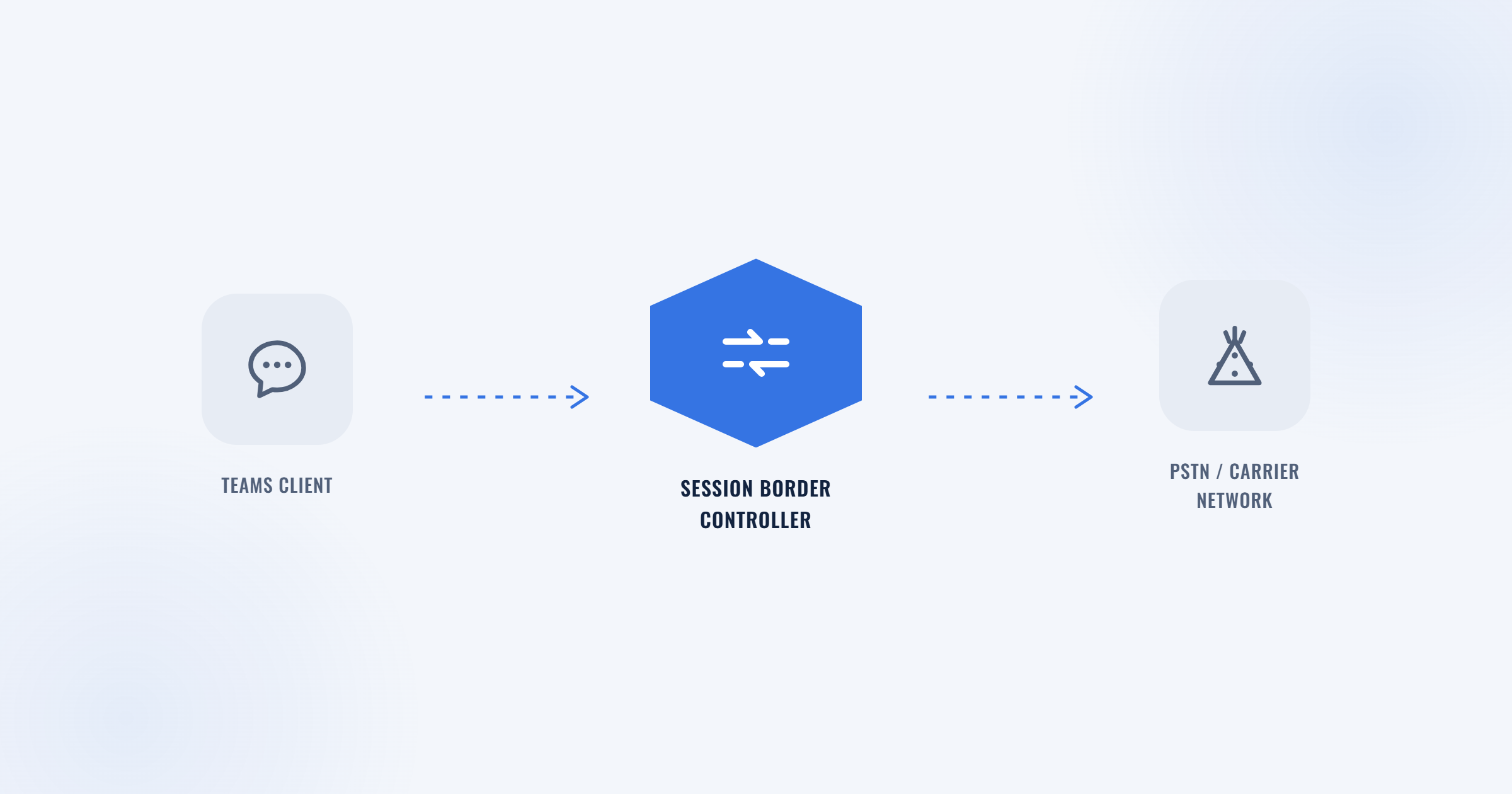
The session border controller makes Direct Routing possible, and makes it your responsibility.
Direct Routing connects Microsoft Teams to the public switched telephone network (PSTN) through your own SIP trunking provider rather than through a calling plan that Microsoft bills and manages. A session border controller sits between Teams Phone System and your carrier, handling the SIP signaling that sets up, manages, and ends each call.
The SBC must be certified by Microsoft specifically for Direct Routing. Certification covers the firmware version, signaling behavior, and security configuration that Teams expects. Connecting an uncertified device, or running an unsupported firmware version on a certified device, can put call quality and connectivity issues outside Microsoft’s support boundary.
Once the SBC is in place, your managed service provider or telecom team configures it to route outbound calls from Teams Phone System to the carrier and inbound calls back to Teams-enabled devices. This can include third-party private branch exchange (PBX) systems and analog endpoints.
Direct Routing versus Calling Plans versus Operator Connect
There are three ways to connect Teams to the phone network. The deciding factor is who manages the SBC, not simply the price.
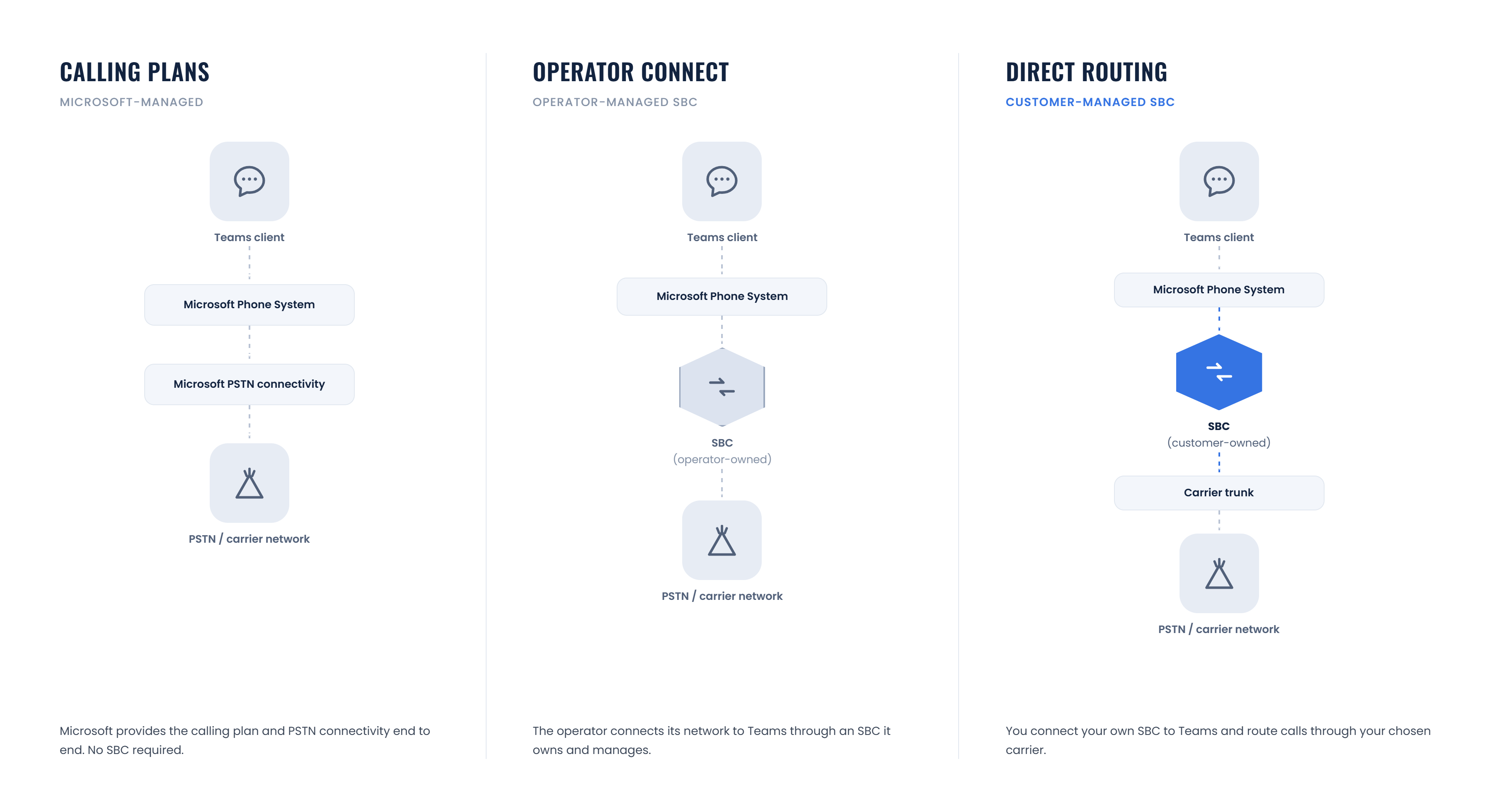
Comparisons often frame the decision as Calling Plans versus Direct Routing. Since Microsoft launched Operator Connect, that is no longer the full picture. All three provide the core Teams Phone calling experience. What changes is where the infrastructure and administration sit.
| Calling Plans | Operator Connect | Direct Routing | |
|---|---|---|---|
| Who manages the SBC | Microsoft | Your chosen operator | You or your managed service provider |
| Setup | Assign numbers in Teams admin center | Select an approved operator; no hardware to deploy | SBC procurement, certification, and configuration |
| Carrier choice | Microsoft is the carrier | Choose from Microsoft’s approved operator list | Choose a provider on your own commercial terms |
| Best fit | Smaller, single-country deployments | Organizations that want carrier flexibility without owning the SBC | Multi-vendor, multi-region environments with existing carrier contracts or complex routing needs |
None of these options is obsolete, and none is universally better. Calling Plans remain the simplest path for organizations without complex telephony requirements. Operator Connect trades some control for removing SBC management from your side of the equation. Direct Routing is the right choice when you need to keep an existing carrier contract, connect Teams to infrastructure you already operate, or reach systems that Microsoft’s operator marketplace does not cover.
For more background on SBC architecture, see IR’s complete guide to session border controllers. IR’s earlier overview of using Microsoft Teams Direct Routing provides additional context on the deployment model.
What you need to deploy Direct Routing
Microsoft-certified SBCs in 2026
Microsoft has stopped accepting new vendors into the certification program, so plan around the list that exists.
As of early 2026, the certified vendor list covers AudioCodes, Ribbon Communications, Oracle, TE-SYSTEMS, and Thinktel, with certification applying to specific hardware or virtual SBC models and firmware versions. Certification is granted per firmware version, not simply per vendor.
Confirm your SBC vendor’s certified firmware before deployment and again before any major upgrade. Running an unsupported firmware version on an otherwise certified device can put the deployment outside the expected support boundary.
Phone System licensing
Every user who makes or receives PSTN calls through Teams needs a Phone System license alongside their Microsoft 365 plan. Users who need to add external participants to a scheduled meeting by phone also need an audio conferencing add-on.
These licensing requirements apply whether you connect through Direct Routing, Operator Connect, or a Calling Plan. The connection method changes who provides the PSTN service; it does not remove the need to license users for Teams Phone capabilities.
Deploying Direct Routing: the practical steps
Direct Routing deployments typically stall at one of five points. Plan for all five up front.
- Confirm your Teams foundation. Direct Routing assumes Teams is already your primary collaboration platform. Complete any outstanding migration work first.
- Choose a certified SBC and provider. Decide whether your team or a managed service provider will manage the SBC, and confirm the exact model and firmware version against Microsoft’s current certification list.
- Configure the SBC and SIP trunk. Set up routing rules, security configuration, and the SIP trunk connection to the carrier.
- Decide on media bypass. Media bypass keeps voice traffic between the SBC and the Teams client instead of routing it through Microsoft Phone System. This can reduce latency and hops in transit.
- Port existing numbers and train users. Number porting avoids unnecessary caller impact. Training on Teams-specific calling features determines how much value the organization captures from the deployment.
Emergency calling needs its own check. For Direct Routing, Teams passes the caller’s current location to the certified SBC. The SBC must route the call and location data to an emergency routing service provider before the call reaches the appropriate public safety answering point. In the United States, this is a legal requirement and an easy step to miss in a broader rollout.
Where Direct Routing deployments break after launch
Most Direct Routing problems trace back to one of four places, and the SBC sits in the middle of all of them.
Getting Direct Routing configured is not the same as keeping it running. Common production failure points include:
- Certification or firmware mismatches: an SBC upgrade can move a device outside its certified version.
- Codec negotiation failures: changes on the Teams or carrier side can prevent the endpoints from agreeing on a usable codec.
- One-way or no audio: Network Address Translation (NAT) traversal issues can interrupt media at the SBC boundary.
- Call quality degradation under load: session capacity or transcoding limits can affect calls even when the network appears healthy.
Because the fault can sit with Teams, the SBC, or the carrier, these problems are difficult to isolate without visibility across the full call path. That is a monitoring problem, not only a configuration problem.
Monitoring Direct Routing in production: what to watch
Direct Routing splits responsibility for a call across three parties. Visibility tells you which one to contact.
Once Direct Routing is live, the SBC becomes the seam between Teams Phone System and your carrier infrastructure. A focused monitoring approach should track:
- SIP registration and call setup success rates.
- Concurrent sessions compared with the SBC’s licensed capacity.
- Media quality indicators such as Mean Opinion Score (MOS), jitter, and packet loss.
- Call routing and failure patterns across Direct Routing and any other PSTN connection method in the environment.
- Performance across the Teams Phone System, SBC, carrier, and user endpoint.
For deeper guidance on monitoring the carrier-facing layer, see IR’s guides to SIP monitoring and the fundamentals of SIP trunking.
How IR Collaborate supports Direct Routing visibility
IR Collaborate, powered by the IR Prognosis platform, gives teams a view across the components that affect call performance:
- Near-real-time carrier network visibility alongside Direct Routing.
- Support for multi-tenant SBCs, so a degraded call can be traced across Teams Phone System, the SBC, and the carrier without switching between separate management consoles.
- Multi-vendor visibility across Teams, Cisco, Avaya, and other platforms in the same environment without locking into one vendor.
- Flexible cloud, on-premises, and hybrid deployment options that match how Direct Routing is deployed.
For organizations running Teams alongside other UC platforms, the same visibility can extend across the wider environment rather than stopping at Direct Routing.
Frequently asked questions
What is Microsoft Teams Direct Routing?
Direct Routing connects Microsoft Teams to the public telephone network through a Microsoft-certified session border controller and your own carrier instead of a Microsoft Calling Plan.
What is the difference between Direct Routing and Operator Connect?
Both connect Teams to a carrier of your choice. With Operator Connect, the operator manages the SBC and infrastructure, with setup handled inside the Teams admin center. Direct Routing puts SBC configuration in your hands or your managed service provider’s, which takes more effort but gives you more control over routing and integration.
Which SBCs are certified for Microsoft Teams Direct Routing?
As of early 2026, Microsoft’s certified vendor list includes AudioCodes, Ribbon Communications, Oracle, TE-SYSTEMS, and Thinktel. Certification applies to specific models and firmware versions, and Microsoft is not currently accepting new vendors into the certification program. Confirm the current certification status before deployment.
Do I need a Microsoft Phone System license for Direct Routing?
Yes. Every user making or receiving PSTN calls through Teams needs a Phone System license in addition to their Microsoft 365 plan, regardless of which PSTN connection method you use.
Can I use Direct Routing with a third-party PBX?
Yes. Direct Routing supports interoperability between Teams and customer-owned telephony equipment, including third-party PBX systems and analog devices, through the SBC.
What causes poor call quality on Direct Routing?
Many call quality issues trace back to the SBC boundary, including codec mismatches, NAT traversal problems that cause one-way audio, and session capacity limits under load. Isolating the cause requires visibility across the SBC, carrier, and Teams Phone System.
What is media bypass, and do I need it?
Media bypass keeps voice traffic directly between the SBC and Teams client instead of routing it through Microsoft Phone System. It is not required, but it can reduce latency and hops in transit. Confirm the design with your SBC provider if call quality is a priority.
Does Direct Routing support emergency calling?
Yes. Teams passes the caller’s location to the certified SBC, which routes the call and location data to an emergency routing service provider before it reaches the appropriate public safety answering point.
Conclusion
Direct Routing has not become obsolete since Operator Connect arrived. It is one of three legitimate answers to the same question and remains the right option when an organization needs control that a managed alternative does not provide.
What has changed is the boundary of responsibility. Microsoft’s certification list has stopped growing, which means organizations running Direct Routing well in 2026 need to treat the SBC as infrastructure they actively monitor, not infrastructure they configure once and leave alone.
See how IR Collaborate provides multi-vendor visibility across Direct Routing, your carrier network, and the rest of your Teams environment. Request a Demo.