


.png?width=141&height=141&name=Transact%20(1).png)






.svg)

.svg)
.svg)
.svg)


%201.svg)



















A performance testing tool that can hammer a page with synthetic traffic isn’t proof your customers will have a good experience. It’s proof a script ran.
For enterprises running customer-facing voice, web, and video systems, that gap is the whole evaluation. The market is full of tools that can generate load. Far fewer can tell you whether real customers, on real networks, through a real multi-vendor stack, will actually get the experience you’re promising them — and that’s the distinction that should drive your shortlist.
What a performance testing tool actually has to prove
The evaluation bar is higher than most feature lists suggest.
Performance testing measures whether a system meets its stated performance criteria — speed, stability, and scalability — under a defined workload. That’s the textbook definition, and most tools on the market can do it for a single web page or API endpoint.
What it doesn’t automatically tell you is whether the experience holds up: whether a contact center agent’s screen pop still loads in two seconds when call volume triples, whether video quality survives a multi-vendor handoff between your SBC and a cloud UCaaS platform, or whether a customer on a degraded mobile connection gets the same result as one on fiber. If your environment is a single website, generic performance testing tools are probably enough. If it’s a UC or contact center estate spanning voice, web, and video across multiple vendors, the evaluation bar is higher.
The criteria that actually decide which tool is right for you
Start with what the tool has to prove for your environment, not the feature checklist.
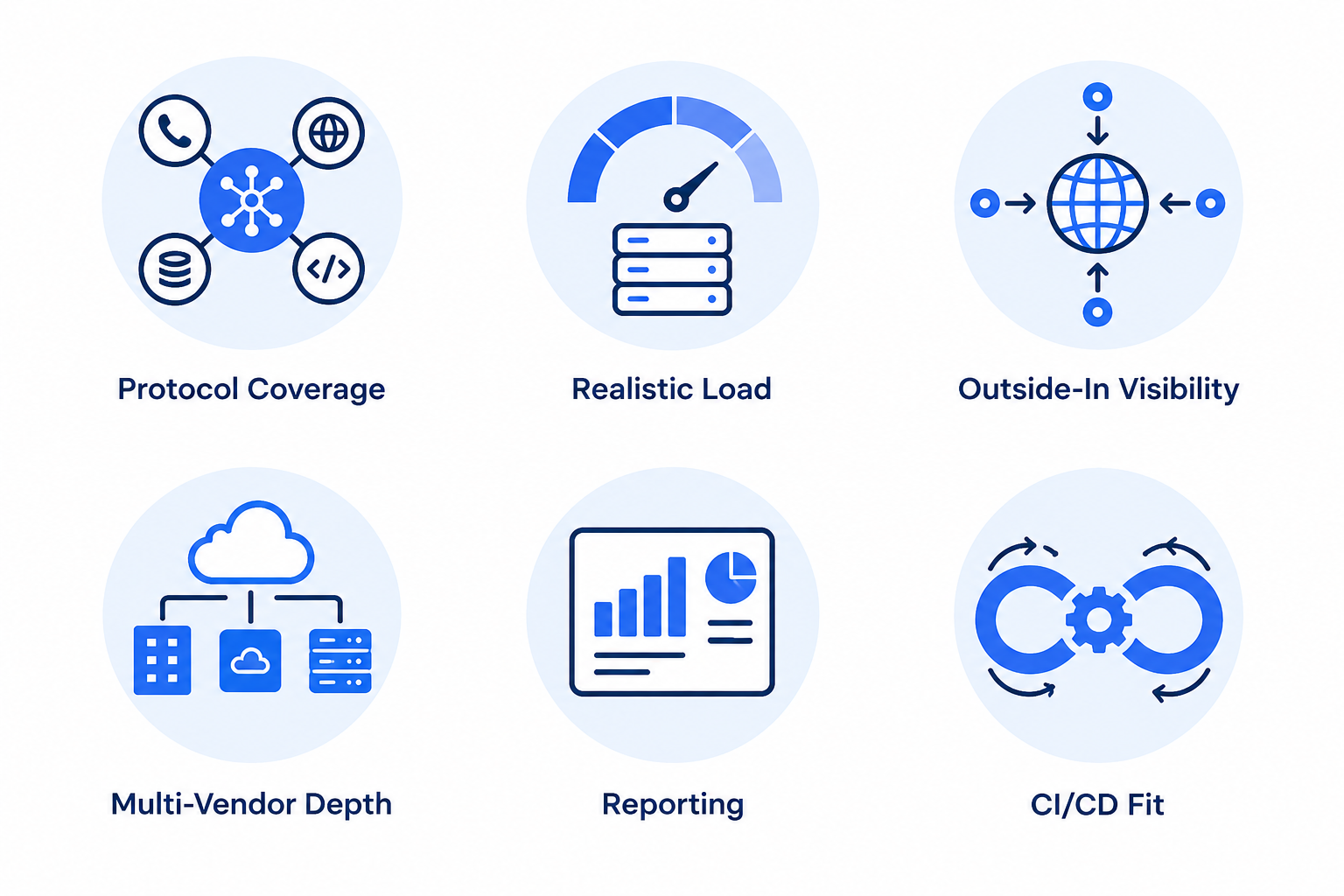
- Environment and protocol coverage. Confirm the tool supports every protocol your stack actually uses — HTTP/HTTPS for web, SIP and RTP for voice, WebRTC for video — not just the ones easiest to demo.
- Realistic load and concurrency simulation. The tool should simulate real, geographically distributed users and call patterns, not just repeat the same script from a single origin at increasing volume.
- Outside-in visibility, not just internal metrics. Internal telemetry tells you what your systems think is happening. Outside-in testing tells you what the customer actually experienced — including packet loss, jitter, and picture quality your internal dashboards may never surface.
- Multi-vendor depth. If your environment spans Microsoft, Cisco, Zoom, Avaya, Genesys, or Poly, confirm the tool tests across that estate rather than one vendor in isolation.
- Actionable reporting, not just raw data. Look for automated alerts that pinpoint specific failure modes — unavailability, long response times, packet loss — rather than a dashboard you have to interpret manually.
- Fit with your release cycle. If you’re deploying continuously, confirm the tool integrates with your CI/CD pipeline so performance testing happens before code reaches production, not after.
Testing and monitoring get evaluated side by side more often than not — if you’re doing both, our buyer’s guide to network monitoring tools walks through many of the same questions.
The testing types your tool needs to run
One tool, several distinct jobs — strength at one doesn’t guarantee strength at all of them.
Most performance testing tools are asked to run several distinct test types, and a tool that’s strong at one isn’t automatically strong at all of them. Load testing confirms your system handles expected traffic within acceptable performance degradation. Stress testing pushes past that limit deliberately, to see how the system fails and whether it recovers. Spike testing checks how the system handles a sudden, sharp jump in demand — a product launch, a breaking-news moment, or a seasonal peak. Soak testing runs a sustained load over hours or days to catch slow leaks — memory, disk, and degraded response time — that only show up over time.
If you’re not sure which of these your evaluation needs to prioritize, the difference between load testing and stress testing is worth understanding in more depth before you shortlist tools — it changes what “passing” means for your environment.
Where generic web-testing tools fall short for UC and CX environments
A page that loads fast isn’t the same thing as a call that doesn’t drop.
Most buyer’s-guide content treats performance testing as a generic web and API concern: page load speed, Lighthouse-style scores, and synthetic scripts against a single endpoint. That’s a reasonable bar for a marketing website. It’s not enough for a contact center or UC environment, where the thing you’re actually protecting is a live voice call, a video meeting, or an agent’s real-time screen — not a static page.
A tool built for generic web testing can tell you a page loaded fast. It typically can’t tell you whether a call degraded mid-conversation, whether video froze during a vendor handoff, or whether an IVR held up when ten thousand callers hit it during an outage window. That’s not a knock on those tools — they’re built for a different job. It’s a reason to match the tool to the environment before you buy, not after.
The practical difference shows up in what each approach can actually tell you when something goes wrong:
| Generic web performance testing | Purpose-built UC/CX testing | |
|---|---|---|
| Protocol scope | HTTP/HTTPS, page and API endpoints | HTTP/HTTPS plus SIP, RTP, WebRTC — voice, web, and video together |
| Environment fidelity | Synthetic script against a single origin | Real telephony calls and sessions across your actual multi-vendor stack |
| Visibility | Internal metrics: did the request complete | Outside-in: what the customer experienced — jitter, packet loss, picture quality |
| What a failure tells you | The page was slow | The specific interaction that broke, and where in the stack it happened |
The takeaway isn’t that generic tools are inferior — they’re built for a different job. It’s that matching the tool to the environment, before you buy, decides whether test day tells you anything you can act on.
A guide to testing your entire technology ecosystem
A fuller framework for evaluating performance testing across any environment, not just voice and video.
Download callout to be connected to the approved HubSpot CTA module before publishing.
How IR Collaborate can help
Built for the gap generic tools leave open.
IR Collaborate’s customer experience testing solutions are built specifically for the gap generic tools leave open.
- HeartBeat. Runs outside-in validation around the clock, using real telephony calls to replicate actual customer interactions.
- WebBeat. Does the same for your web and online channels, so you know your online experience is working before a customer tells you otherwise.
- StressTest Premium and StressTest for Video. Push your voice, web, and video systems under real-world load conditions — the kind your environment will actually see at peak, not a synthetic approximation of it.
- Multi-vendor coverage. Runs across Microsoft, Cisco, Zoom, Avaya, Poly, and the rest of your UC and contact center estate, so results reflect your actual environment rather than one vendor tested in isolation.
Frequently asked questions
What’s the difference between web performance testing and website speed testing?
Website speed testing typically measures a single metric — page load time. Web performance testing is broader: it covers speed, stability, scalability, and behavior under load, across the full user journey rather than one page.
What’s the difference between load testing and stress testing?
Load testing confirms a system handles its expected traffic volume within acceptable performance degradation. Stress testing deliberately pushes past that limit to see how the system fails and whether it recovers.
How do I evaluate a load testing tool for network resilience?
Check whether it simulates realistic, geographically distributed load rather than a single-origin script, whether it tests your actual protocol stack end to end, and whether its reporting pinpoints the specific failure point rather than just a pass/fail result.
What types of software testing fall under performance testing?
Load, stress, spike, soak, and scalability testing are the core types. Each answers a different question about how your system behaves under demand, and most environments need more than one.
Do I need a different tool for voice, web, and video, or can one tool cover all three?
It depends on your environment. A single-channel web application may only need web testing. A UC or contact center environment spanning voice, web, and video benefits from a tool built to test all three together, since issues in one channel often affect the others.
How often should we run performance tests?
Before any major deployment or migration, ahead of known peak-traffic events, and on a regular ongoing cadence — not just once before go-live. Environments change continuously, and a tool tested once is a snapshot, not an assurance.
What’s the difference between synthetic and real-user testing?
Synthetic testing simulates user activity on a schedule you control, which makes it useful for proactive, before-it-breaks validation. Real-user monitoring observes actual customer traffic, which tells you what already happened rather than what will happen under a specific scenario.
Can performance testing tools integrate with CI/CD pipelines?
Many can, and for continuously deployed environments this matters — it moves performance validation earlier in the release cycle, so issues surface before code reaches production rather than after.
Conclusion
Choosing a performance testing tool isn’t really a features conversation — it’s a question of what you need the tool to prove, and for most enterprises running customer-facing systems, that’s a higher bar than “can it generate load.” The tools that pass that bar are the ones built to test what your customers actually experience, across every channel and every vendor in your stack, not just the ones easiest to simulate.
See what that looks like for your environment. Get a demo of IR Collaborate’s customer experience testing solutions.